Supplier contracts
Record what you resell from suppliers, such as phone systems, broadband, leased lines and hosting, with notice deadlines and renewals worked out for you, a renewals calendar, a CSV or Excel import, billing on the customer's invoices and alerts.
A supplier contract is something you buy from a supplier and resell to a customer: hosted phone seats, a broadband or leased line, SIP trunks, licences bought outside your distributors, hardware maintenance or hosting. Tenvara keeps the term, the notice period, what it costs you and what the customer pays, works out the dates that matter, bills it on the customer's invoices and warns you before anything renews without you knowing.
The list
Open Sales and billing > Supplier contracts, in the Purchasing group. The page has three tabs: Supplier contracts, Renewals calendar and Price changes.
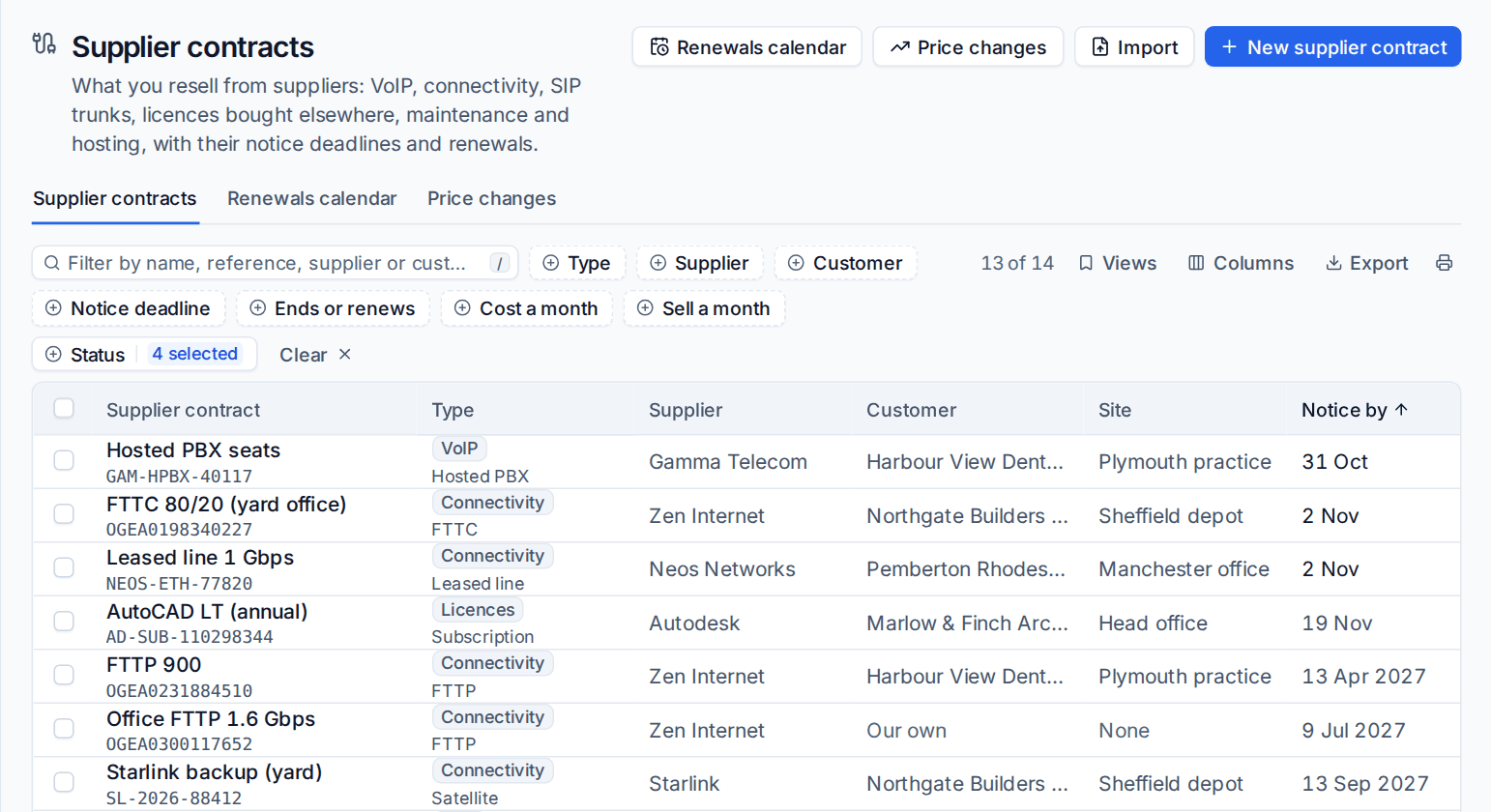
Each row shows the contract's name and reference, its type, supplier, customer and site, the Notice by date, when it ends, and the cost, sell price and margin a month. A contract with no customer shows as Our own, for your own office line or hosting.
- Filter by type, supplier, customer, notice deadline, end date, cost, sell price and status.
- Views has Notice due in 30 days, Ending or renewing in 30 days, Ending or renewing this quarter, Connectivity, VoIP and SIP trunks, Licences and Ended.
Each customer has a Supplier contracts tab (under Commercial) with their own list. Licence subscriptions you entered by hand show in the same lists with a Licence subscription badge, so everything bought elsewhere is in one place; they are still billed by licences, never twice.
Add a supplier contract
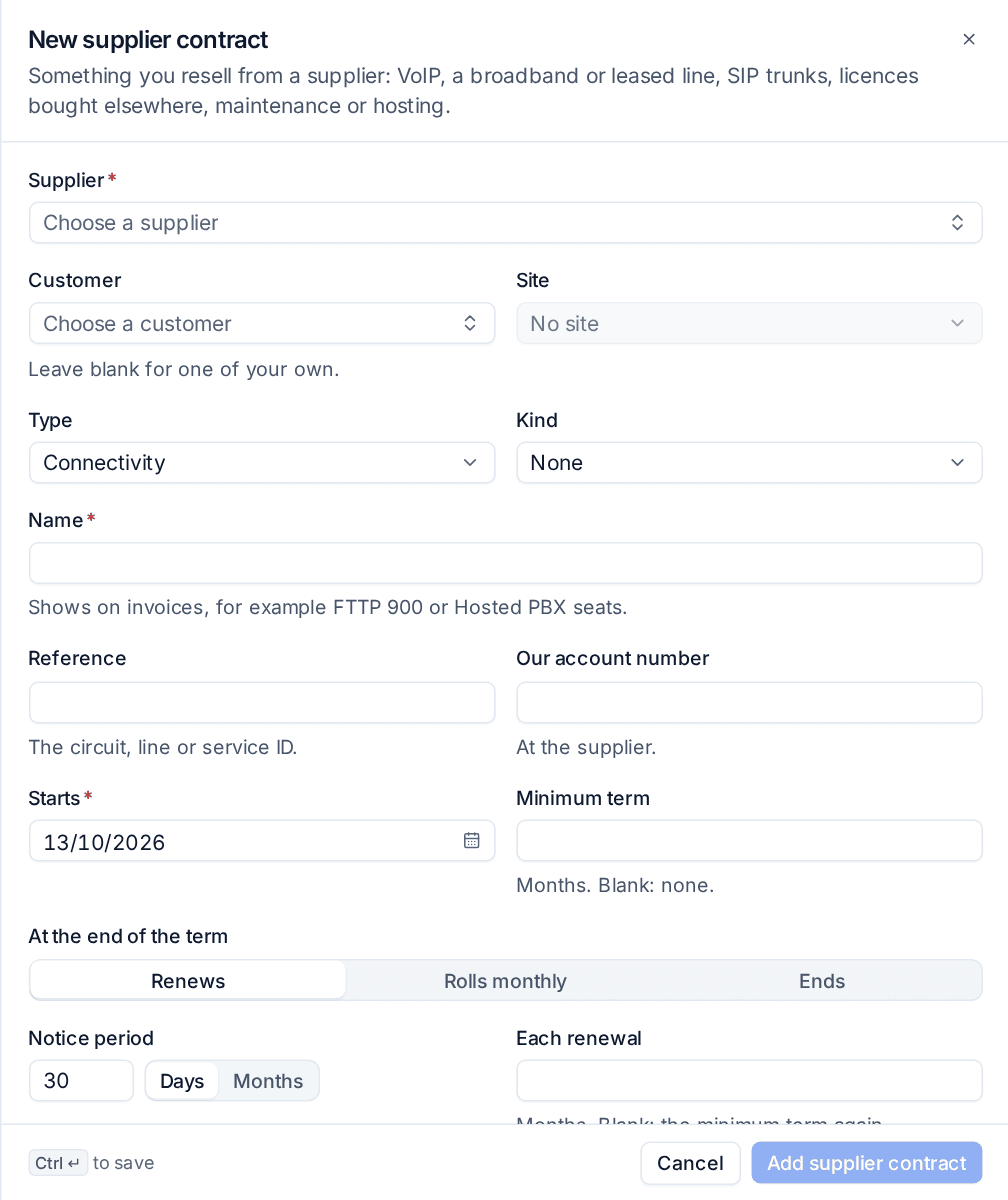
- Press New supplier contract.
- Choose the Supplier (see Suppliers and distributors), the Customer and, if you like, the Site. Leave the customer blank for one of your own.
- Choose the Type (VoIP, Connectivity, SIP trunks, Licences, Hardware maintenance, Hosting or Other) and a Kind within it, such as FTTP or Leased line.
- Enter the Name, which shows on invoices, the Reference (the circuit, line or service ID) and Our account number at the supplier.
- Set the term: the day it Starts, the Minimum term in months, what happens At the end of the term (Renews, Rolls monthly or Ends), the Notice period in days or months, and how long Each renewal runs.
- Set the price: the Quantity and Unit, how often it is Billed (Monthly, Quarterly or Annually), the Cost per unit the supplier charges each period and the Sell per unit the customer pays.
- Choose the Status (Draft, Active, Notice given or Ended) and press Add supplier contract.
The contract page
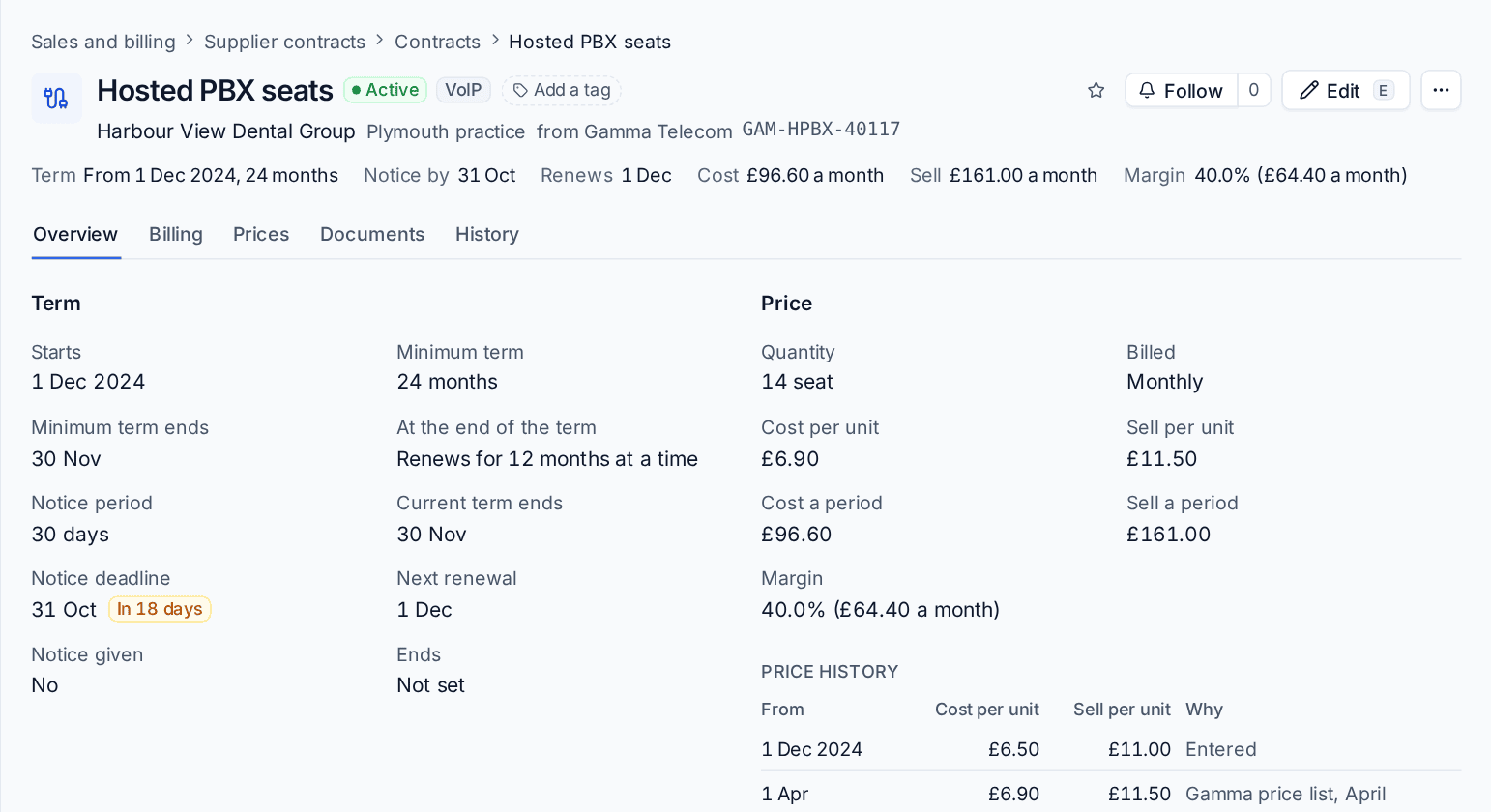
The header shows the term, the Notice by date, when it renews or ends, and the cost, sell price and margin a month. The tabs are Overview (the term, the price and its history, the details and comments), Billing, Prices (see Supplier price changes and passing them on), Documents for the signed contract, and History.
You never type a notice deadline. The dates are worked out from the start date, the term and the notice period each time they are shown, so they cannot go stale:
- Notice deadline: the last day you can give notice so the contract ends with the term and does not renew.
- Next renewal: the day after the current term, or the day it goes month to month. Renewals are counted from the start date, so they never drift.
- Ends: set once notice is given, or for a contract that simply ends. An end date you enter by hand wins.
The renewals calendar
The Renewals calendar tab shows a month across every customer with each contract's notice deadlines, automatic renewals, ends and dated price changes.
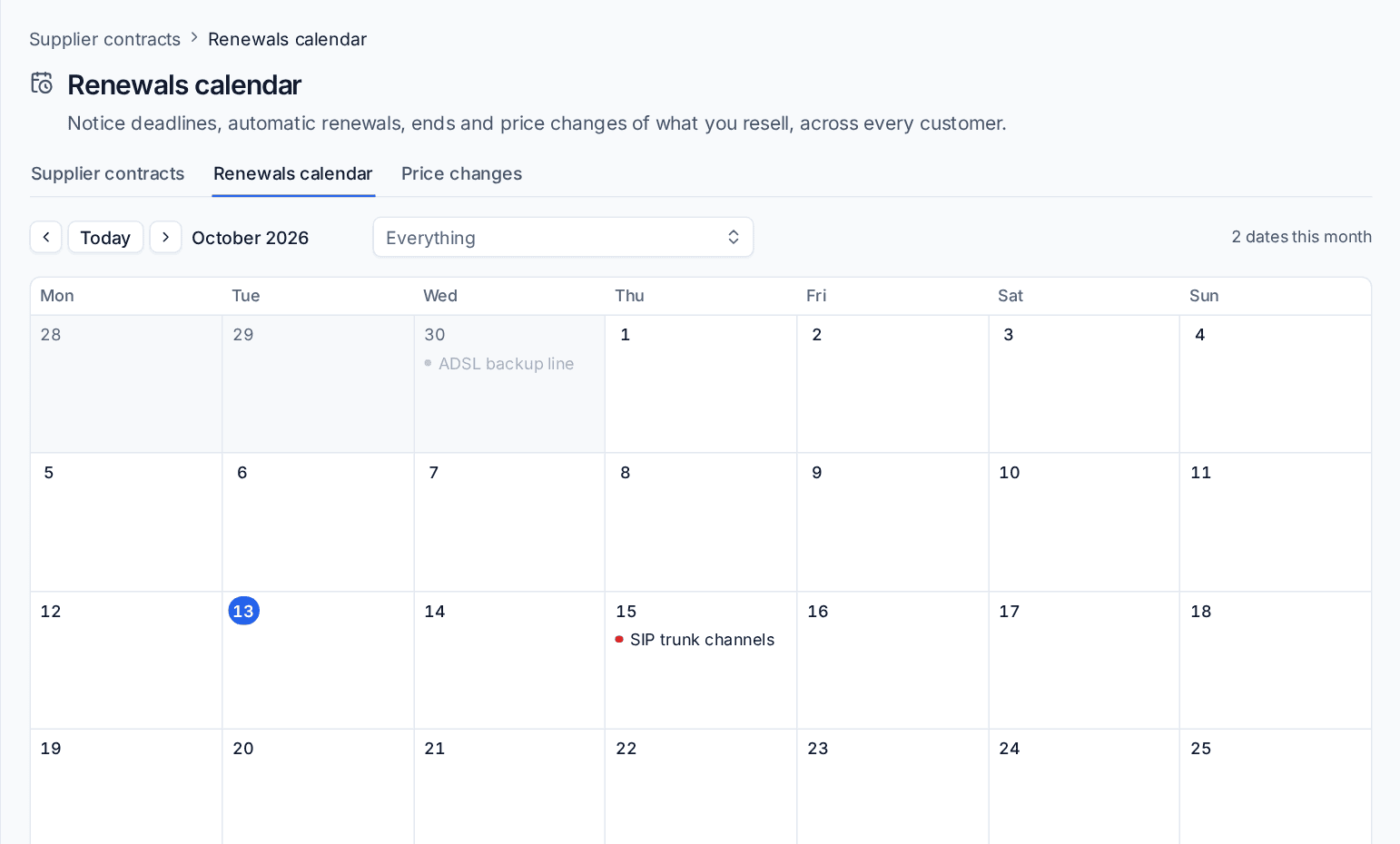 Home can show a Notice deadlines this month block.
Import from a spreadsheet
- Press Import and choose a CSV or Excel file with one contract a row.
- Check the column chosen for each field. Tenvara suggests them from your headings.
- Press Check the rows. This dry run lists what each row would do (add, update or skip, with the reason) and saves nothing.
- Import.
A row with a reference the same supplier already has updates that contract, so importing a file twice makes no duplicates.
Billing it to the customer
A supplier contract with a customer and a sell price bills as a recurring line on the customer's own contract, so it reaches their invoices through your normal invoice runs. See Contracts and invoicing.
The Billing tab says whether it bills and on which contract. It has the Bill the customer switch, the Account code, Item code and Tax category, Same as licence subscription (link it and licences bills it, so it is never billed twice), the Next invoices the runs will write for this month and the next two, and One-off charges: press Add charge for an installation or an engineer visit, billed once in the month of its date.
The line bills at the contract's own frequency, pro rata for a part period, at the sell price in force each day, and carries the reference, for example "Broadband: FTTP 900, circuit ABC123, October 2026". It does not bill when billing is off, there is no customer, it is a draft, the customer has no contract or their contract is in another currency; the tab says which.
In Settings > Billing rules, on the Supplier contracts tab, set whether new supplier contracts bill the customer, the Invoice line wording and the account codes, overall and by type. The codes go on the invoice lines and into Xero or your connected accounting package. See Xero and QuickBooks.
Alerts
Each morning Tenvara checks every supplier contract and raises one alert per customer for each kind of problem:
- the last day to give notice is within 30 days (critical in the last week);
- a contract renews, or goes month to month, by itself within 30 days;
- a dated supplier price rise is coming within 30 days, with what it adds a month;
- a contract's margin is below your lowest margin;
- a supplier contract has ended and the customer's contract still bills it;
- a line on a customer's contract reads like a resold service, such as broadband or a SIP trunk, with no supplier contract behind it.
An alert clears when its problem has gone. Turn each kind on or off, and set the days, the lowest margin and the words that mark a resold service, under Alerts on the same Settings tab. Each can differ per customer.
In the customer portal
If you choose, customers see the lines and services you resell to them in the portal: the type, reference, site, quantity, when each renews or ends, and the date to tell you by if they want a change. They never see the supplier, your cost or your margin. In Settings > Customer portal, on the What customers see tab, under Services and agreements, turn on Show lines and services from suppliers, and choose whether to show what each costs them and how long before the supplier's notice deadline they must tell you.
Related: Supplier price changes and passing them on, Procurement and stock overview.
Was this page helpful?
Thanks for the feedback.