Supplier price changes and passing them on
Record a supplier's price change from its date, set yearly price rules such as CPI plus 3.9% every April with a floor and a cap, see what each rise does to your margin, and pass it on to the customer by email or with a quote.
Suppliers put their prices up, often every April and often by an inflation figure plus a few per cent. Tenvara keeps each change against the supplier contract from the day it takes effect, works the yearly rises out for you, shows what each one does to your margin, and lets you pass it on to the customer in a couple of clicks.
The Prices tab
Open a supplier contract and choose Prices.
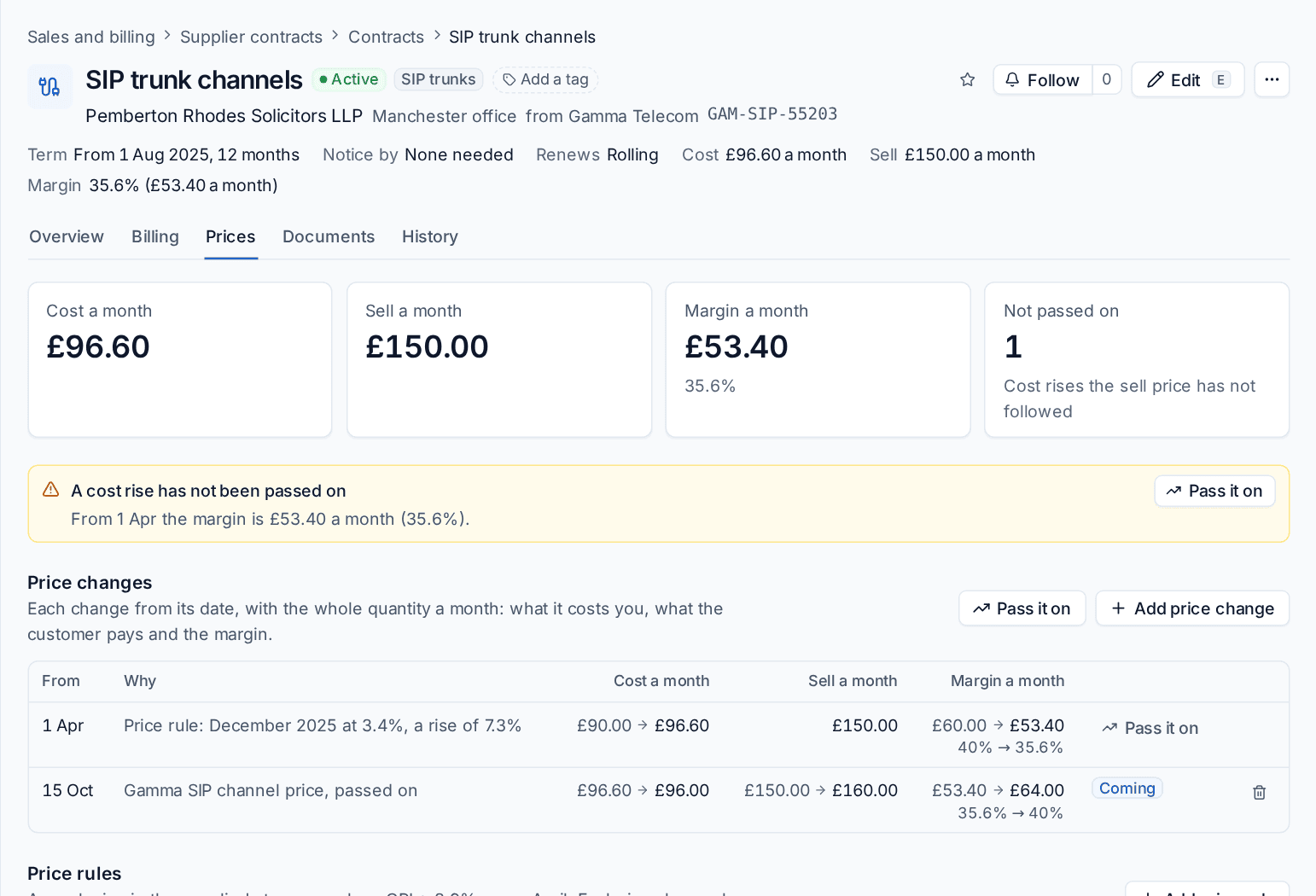
The figures at the top show the Cost a month, Sell a month and Margin a month as they stand today, and Not passed on: how many cost rises the sell price has not followed. When there is one, a banner says what the margin has been since the rise and offers Pass it on.
Below are three lists:
- Price changes: each change from its date, with the whole quantity a month before and after it: what it costs you, what the customer pays and the margin.
- Price rules: yearly rises written into the supplier's terms.
- Passed on to the customer: new sell prices from a date, and how the customer was told.
Add a price change
When a supplier tells you of a new price:
- Press Add price change.
- Set the date it applies From. It must be after the contract starts.
- Enter the new Cost per unit, the new Sell per unit, or both. Leave the sell empty to keep it, or let it follow the cost.
- Say Why, for example "Gamma price list, April".
- Press Add change.
A change that has not reached its date shows as Coming and can be taken off. One already in force stays, because it may have been billed: add a new change to correct it.
Price rules
A price rule is a yearly rise in the supplier's terms, such as "CPI + 3.9% every 1 April".
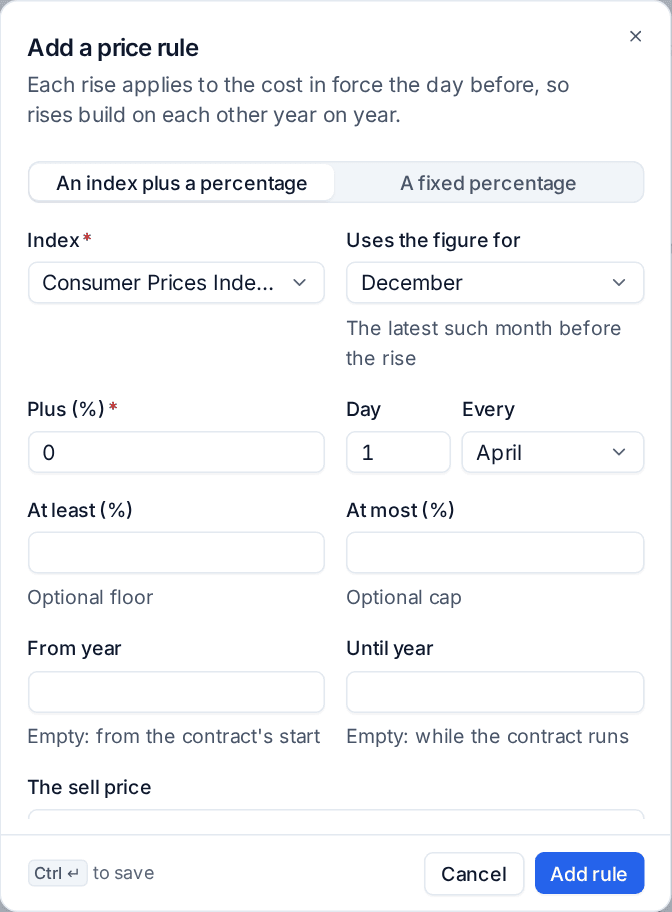
- Press Add price rule.
- Choose An index plus a percentage or A fixed percentage.
- For an index, choose the Index, such as Consumer Prices Index (CPI) or Retail Prices Index (RPI), and which month's figure it Uses the figure for. Tenvara takes the latest such month before the rise, so December's figure, published in January, is used for an April rise.
- Enter the percentage on top in Plus (%).
- Set the Day and month it happens Every year.
- Optionally set At least (%) as a floor and At most (%) as a cap, and a From year and Until year.
- Choose what The sell price does: Sell stays until passed on, Sell rises by the same amount or Sell rises by the same percentage.
- Press Add rule. Reads shows the rule in words before you save it.
Each rise applies to the cost in force the day before, so rises build on each other year on year. A rise is added to Price changes as soon as its index figure is out, up to thirteen months ahead, so you see the margin hit before it lands. Until then the rule says what it is waiting for, for example "Next: 1 Apr 2027, waiting for the December 2026 figure".
Rises already in force are never changed. Switching a rule off or removing it takes away only its future rises.
Price indexes
On Sales and billing > Supplier contracts, open the Price changes tab and press Price indexes to see the inflation figures rules use: each month's annual rate. For the UK, CPI and RPI are read from the Office for National Statistics each morning. For any other country, enter the figures by hand; a figure you enter is never overwritten.
Pass it on
When a cost has risen and the sell price has not followed, pass the rise on to the customer.
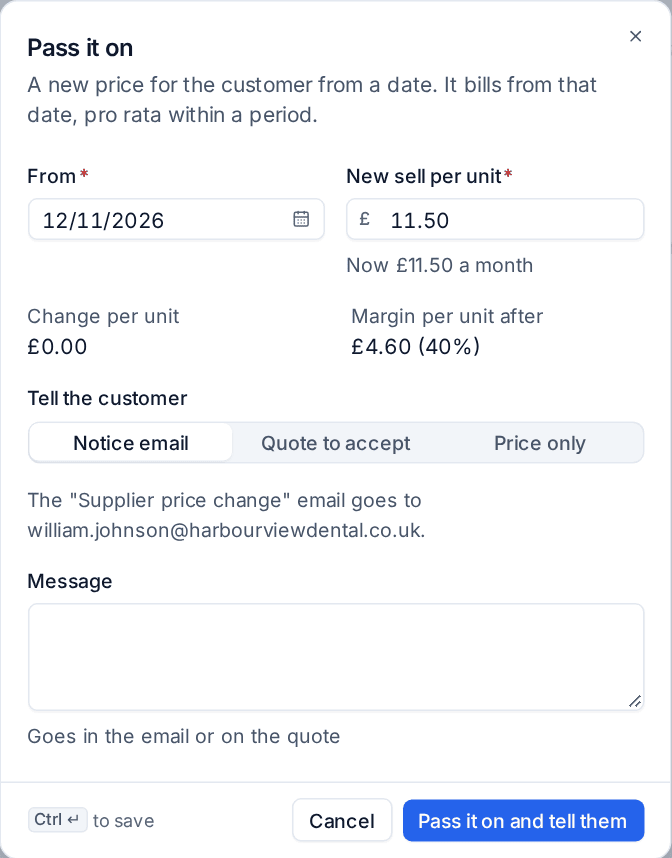
- Press Pass it on on the banner, on the rise's row, or at the top of Price changes.
- Check the date it applies From. Tenvara suggests the date of the rise, or today plus the notice you give customers if that is later.
- Check the New sell per unit. The suggestion keeps your margin; Change per unit and Margin per unit after show what it does.
- Under Tell the customer, choose:
- Notice email: the customer's billing contacts get the "Supplier price change" email with your Message. It says who it will go to.
- Quote to accept: a quote with the new price as a recurring line is raised for you to send. The price changes when they accept it, from the date, or from the day they accept if that is later. If they decline it, or it expires or is withdrawn, nothing changes.
- Price only: the price changes and nothing is sent.
- Press Pass it on and tell them.
The new sell price bills from its date. The next invoice run charges the old price before the date and the new price from it, pro rata within the period, without anyone editing the customer's contract. See Supplier contracts.
A pass can be taken back before its date, or while its quote is still open. The email is the Supplier price change template in Settings > Support email, on the Email templates tab.
Margin impact across customers
The Price changes tab of Sales and billing > Supplier contracts shows the effect of every change and rule over a period, by default from a year back to thirteen months ahead.
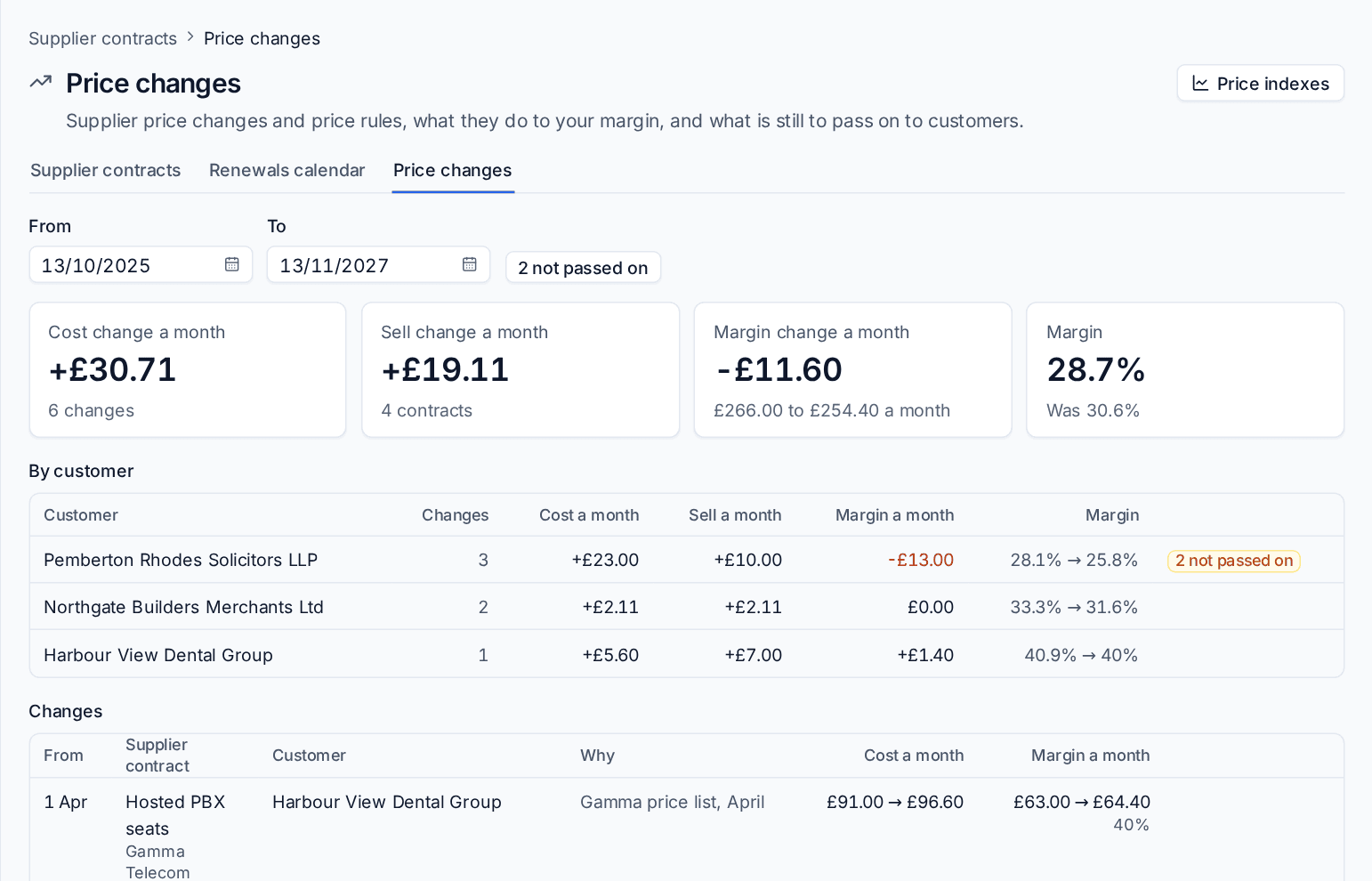
- The figures at the top: Cost change a month, Sell change a month, Margin change a month and the Margin now against what it was.
- By customer: how many changes each customer has, what they do to cost, sell and margin a month, the margin before and after, and how many rises are not passed on.
- Changes: every change in date order with its contract, customer, reason and status: Not passed on, Passed on or Coming.
- Set From and To to change the period, and press the not passed on button to list only the rises you have still to deal with.
Margin needs cost and sell in the same currency; a contract bought in another currency shows its cost change only. A price rise coming in the next 30 days also raises an alert and shows on the renewals calendar.
Settings
In Settings > Billing rules, on the Supplier contracts tab, under Price changes, set what the sell price does when a rule raises the cost, the index month for new rules, whether Pass it on suggests keeping your margin in money or in percent, how it tells the customer to begin with, the Notice to give the customer in days, and whether index figures are fetched every day.
Related: Supplier contracts, Sending a quote and versions.
Was this page helpful?
Thanks for the feedback.