How did it end? Closing alerts and the noise figures
The five outcomes every close asks for, what reopens and what stays closed within 7 days, the 30-day noise figures on Alert types and security rules, automatic lowering with Undo, and the weekly noisiest five.
Every time someone closes an alert, a security detection or an incident, Tenvara asks one question: How did it end? The answers are how Tenvara learns which alerts are worth your time. They decide whether a problem that comes back reopens, they fill the noise figures on Alerts > Alert types and the security rules, and they let Tenvara lower, for one customer, a kind of alert that is nearly always noise there.
The five outcomes
| Outcome | Means | Counts as noise |
|---|---|---|
| Actioned | It was real and someone fixed or stopped it | No |
| False positive | It was wrong: nothing like it happened | Yes |
| Expected or harmless | It happened and was fine: planned, expected, harmless | Yes |
| Our own work | One of your own jobs or actions did it | Yes |
| Vendor routine | A vendor's or the system's own routine did it, such as Windows updating itself | Yes |
Closing an alert
- Open the alert and press Resolve (or tick several in the list and choose Resolve in the bar).
- Under What was done, write what you did, if it helps. It is shown on the alert and copied to its ticket.
- Under How did it end?, choose the outcome. Resolve will not go ahead without one.
- Press Resolve.
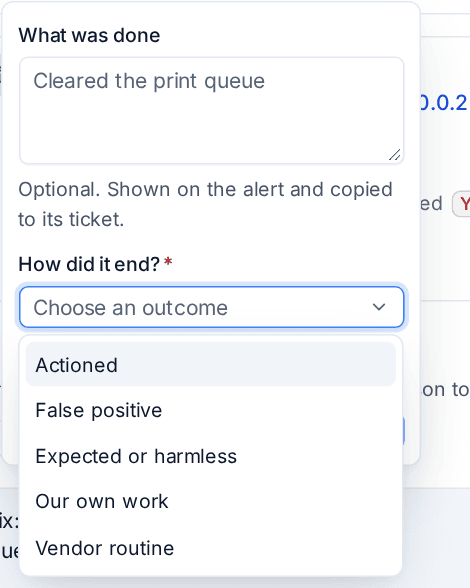
Resolving a security detection or an incident asks the same question; an incident's open detections close with the incident's outcome. Closes Tenvara makes by itself, such as a condition that cleared or one of its own jobs recognised as the cause, record their own outcome or none.
What happens if it comes back
How it ended decides what a repeat within 7 days does:
- Actioned (or no outcome): the fix did not hold, so the alert opens again with Happened again within 7 days, counted and told as newly raised, and a ticket a person closed opens again rather than a new one.
- False positive, Expected or harmless, Our own work or Vendor routine: you already said it is fine, so the repeat joins the closed alert and it stays closed. The first repeat adds one line, for example Happened again; closed as Expected or harmless by Sam Taylor on 3 Nov, so it stays closed. Nobody is told and no ticket opens or reopens. Each repeat still counts in the noise figures.
After 7 days a repeat is a new alert as usual.
The noise figures
Alerts > Alert types shows, for each type, its alerts first seen in the last 30 days and how they ended, as Noise in 30 days: how many there were, the share that was noise and how many made a ticket nobody answered. Hover for the breakdown by outcome.
An alert counts as noise when it was closed as anything but actioned, or when it was not actioned and its ticket had no reply from your team within a day. Alerts Tenvara explained by itself (your own work, a quick recovery) never reached anyone, so they are left out.
With a customer chosen at the top of the page, the figures are that customer's. Security rules have the same figures in a Noise column, with a Noisiest view, and on each customer's rules.
Automatic lowering, and Undo
Once a day, Tenvara looks for kinds of alert that are mostly noise for one customer: at least 10 in 30 days, 80% or more of them noise. Such a type is lowered one step for that customer (critical to warning, warning to information; a security rule goes down a level, never below Low). Other customers are not touched.

The type says so on Alert types, for example Lowered from Critical to Warning for Brightwater Estate Agents: 19 of its 19 items in 30 days were noise. Lowered alerts carry the same line on their trail, and a step up for a VIP or a critical device never takes them back above it.
- The lowering stays until someone undoes it.
- Undo puts the severity back at once. Only alerts first seen after the undo count towards lowering it again, so it is not lowered again the next morning on the same alerts.
- Lowering and undoing are in the activity log. Undoing needs the same permission as changing alert types (security rules: managing security).
There is no switch to stop lowering: every lowering is visible on its page with Undo, and the digest names the noisiest each week.
The weekly noisiest five
The first alert digest each person or address gets in a week has Noisiest five this week: the five alert types and security rules with the most noise for the digest's customers in the last 7 days, with how many of each were noise and the share. It is the quickest way to spot a check that needs tuning or a type to turn off for a customer. Set up digests on the Digests tab of Settings > Notifications: see Alerts into tickets and notifications.
Tip: When a type keeps appearing in the noisiest five, fix the cause rather than resolving it again: tune its threshold with Fine-tune, set a planned state on the device that keeps raising it, add your own addresses under Our own work, or turn the type off for that customer with a reason.
Related
Was this page helpful?
Thanks for the feedback.