Erasing a customer
Erase a customer for good as a GDPR erasure: what goes and what is kept, legal holds, where to start it, backups and the second approval, the erasure page and its certificate, and erasing inactive customers automatically.
Marking a customer inactive keeps everything they hold. Deleting a customer with history only makes them inactive too. Erase customer is the way to make a customer go: it removes everything they own from every store in Tenvara, keeps only what accounting law says you must keep, and gives you a numbered certificate to show it was done.
Erasing is for administrators, and for any other role you give the action to in Roles and permissions. It cannot be undone.
What goes, what is kept
Removed: every record and file the customer owns. Their contacts, sites and devices, tickets with their messages and files, time, contracts, quotes and proposals, sign-offs, chats, documentation and vault entries, projects, visits, reports, monitoring history, security events, Microsoft 365 data held in Tenvara, call records, portal users and their sessions, recordings, anything of theirs in the recycle bin and the retention archive, and their backups. Agents on their devices are told to unregister.
Kept: invoices and credit notes only, with their lines, payments and PDFs and the billing name printed on them, because accounting law requires it. While an invoice still points at the customer, the customer stays in your records as "Erased customer" with a number, and everything else about them is cleared.
Anonymised, not deleted: the timeline, the audit log and the vault audit. Entries about the customer stay so your own trail keeps its shape, but the customer's name, their people's and sites' names, email addresses and phone numbers are replaced with "Erased customer" and the number. The audit log stays tamper evident.
What stops an erasure
- A legal hold on the customer. The dialog shows the hold's reason with a link to the holds; release the hold first. See Audit log, data retention and privacy requests.
- Your own practice customer cannot be erased.
Erase one customer
-
Open the customer.
-
Open More actions (the ... button in the header) and choose Erase customer... at the bottom of the menu.
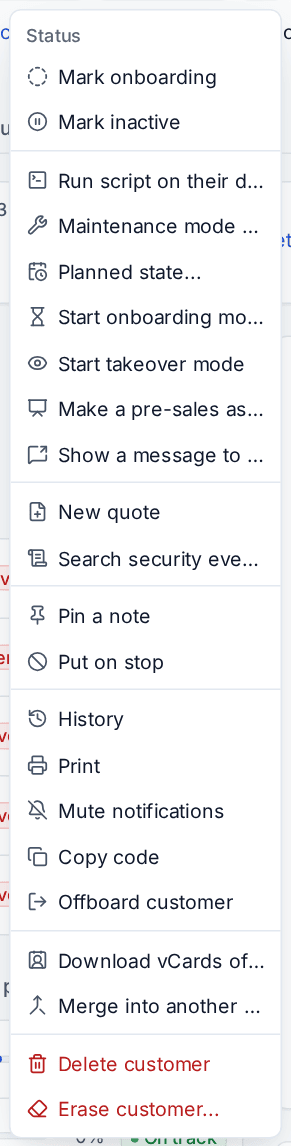
The More actions menu on a customer, with Erase customer at the bottom -
Read the dialog. Under What is erased, Tenvara counts what the customer holds in each store, so you see what is about to go before anything happens. Stores that hold nothing are left out.
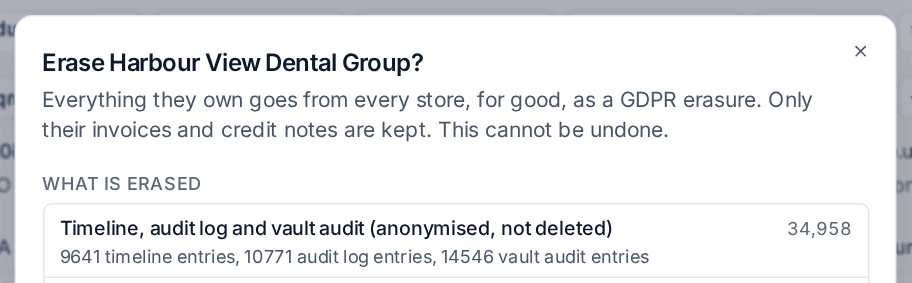
The Erase dialog: what is erased, store by store -
Scroll to the end. Kept lists the invoices and credit notes that stay. Backups need an approval shows when the customer has backups. Anything that blocks the erasure is shown here with why.
-
Type the customer's name to confirm and press Erase customer.
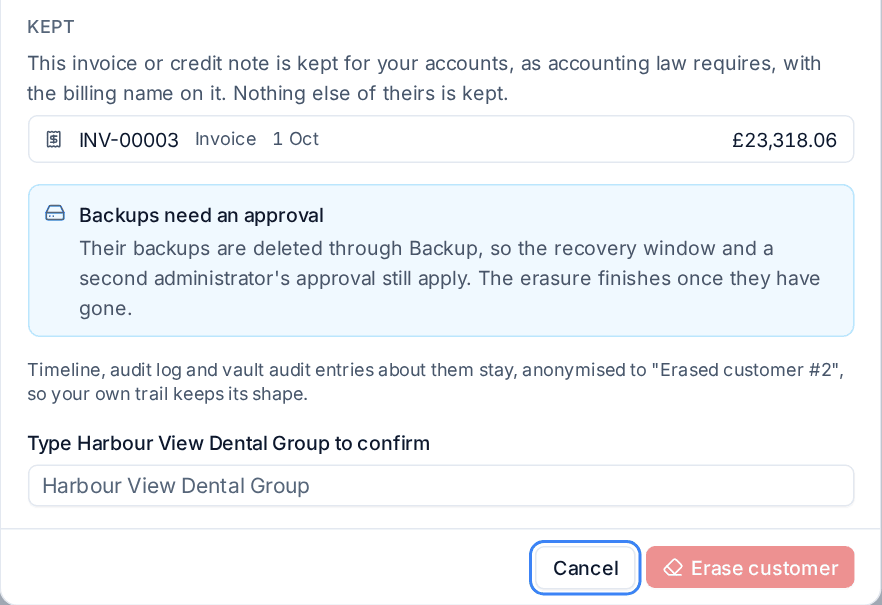
The end of the Erase dialog: the invoice kept, the backup approval and the name to type
The customer page shows a banner while the erasure runs, with a link to its page.
Warning: Download anything you need to hand over first, such as the export from Customer offboarding. The export and the offboarding certificate name the customer, so they are erased with everything else.
Several customers at once
In Customers > All customers, select the customers and choose Erase in the bulk bar. You get one summary per customer, and customers that something blocks are set apart with the reason and are not sent. Type the number of customers being erased to confirm. The result lists each erasure started and any refused.
As the last step of offboarding
Once every other step of an offboarding is done, skipped or not needed, the last step offers Erase them instead... beside Archive. It opens the same dialog. Confirming archives the customer, completes the offboarding and starts the erasure in one go.
Backups and the second approval
A customer's backups are never removed behind Backup's back. The erasure asks Backup to delete them, so Backup's own rules apply: a second administrator approves the delete, and the recovery window runs before the data is gone for good. The erasure waits for both and finishes once the backups have gone. Its page says what it is waiting for and where to act. See "Deleting safely" in Storage locations and immutable backups.
The erasure page and certificate
Customers > Erasures lists every erasure with its number, state and how many stores are done. Open one to follow it.

The page shows who asked for the erasure and when, Progress by store (what was removed, how many files, how many entries were anonymised and what was kept), what a waiting store is waiting for, and under Kept for your accounts the invoices and credit notes that stay.
When the erasure has finished, Certificate downloads a numbered PDF in your brand. It states when the erasure was asked for and by whom, when it started and finished, what was erased store by store, the stores that were checked and held nothing, and what was kept and why. It holds no personal data: the customer appears as "Erased customer" with its number unless you type the customer's name when you download it, because Tenvara no longer has the name. Each download is recorded in the audit log.
Erase inactive customers automatically
Tenvara can erase customers who left long ago, so old data does not sit there for ever. It is off until you switch it on.
- Go to Settings > Data retention and open the Inactive customers tab.
- Set Erase after to a number of months. 0 never erases them.
- Set Warn before erasing in days (14 by default, at least 7) and press Save.
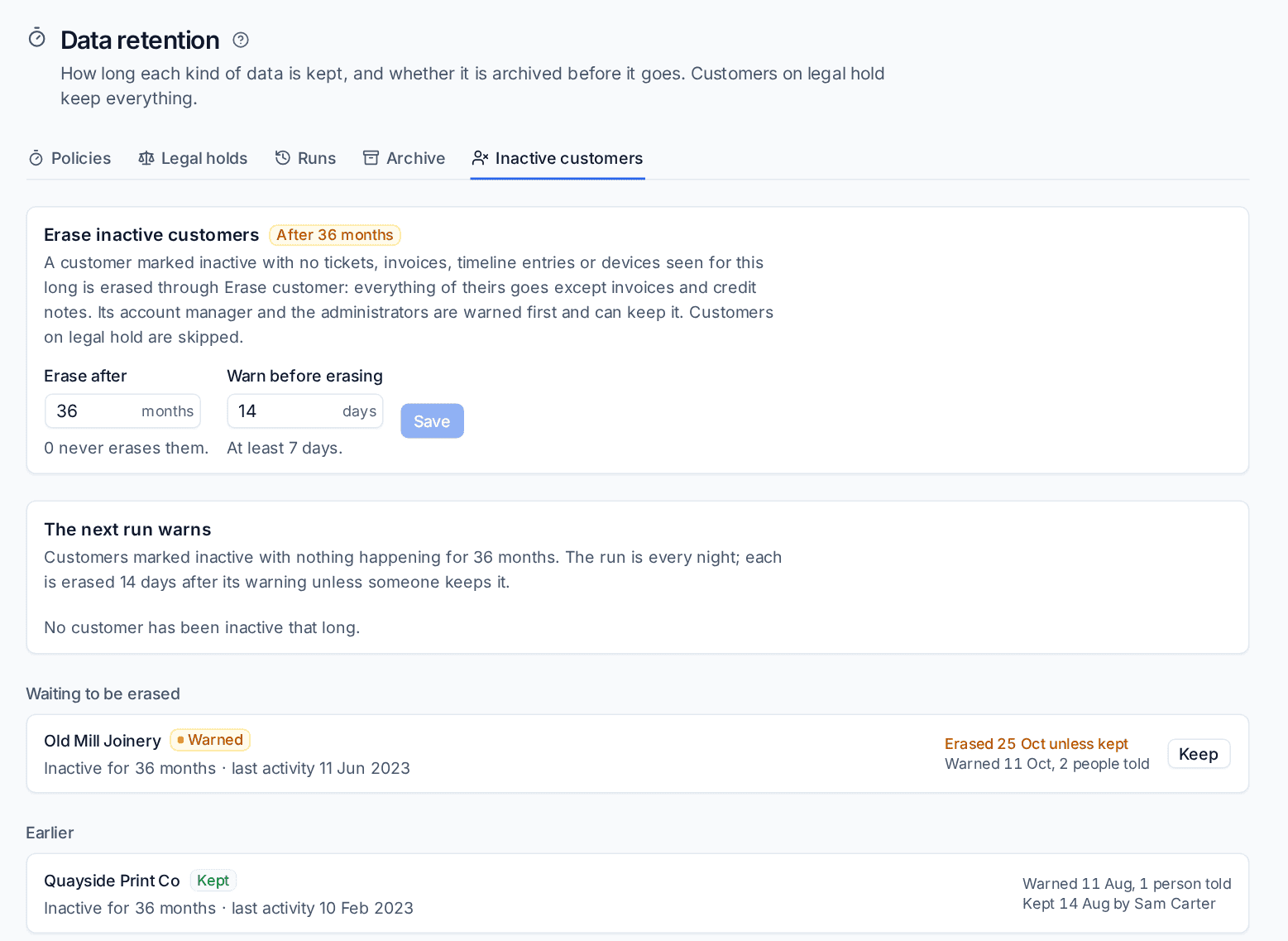
A customer is only picked when it is marked inactive and nothing has happened for the whole period: no tickets, invoices, timeline entries or devices seen. An active customer that is merely quiet is never picked.
The run is nightly. The next run warns lists who would be warned next. When a customer is warned, its account manager and every administrator get an email and a notification, and the customer appears under Waiting to be erased with the date. Anyone warned can press Keep, which is recorded with their name; a kept customer is not warned again until it has been active and then quiet for the whole period once more. Otherwise it is erased on the date shown, through the same erasure as above, and the certificate says the data retention policy asked for it. Customers on legal hold are skipped.
Related
Was this page helpful?
Thanks for the feedback.