AI readiness
The setup section for AI readiness: how often customers are assessed again, alerts for new exposure and new AI apps, and the checks that assessments are running and up to date.
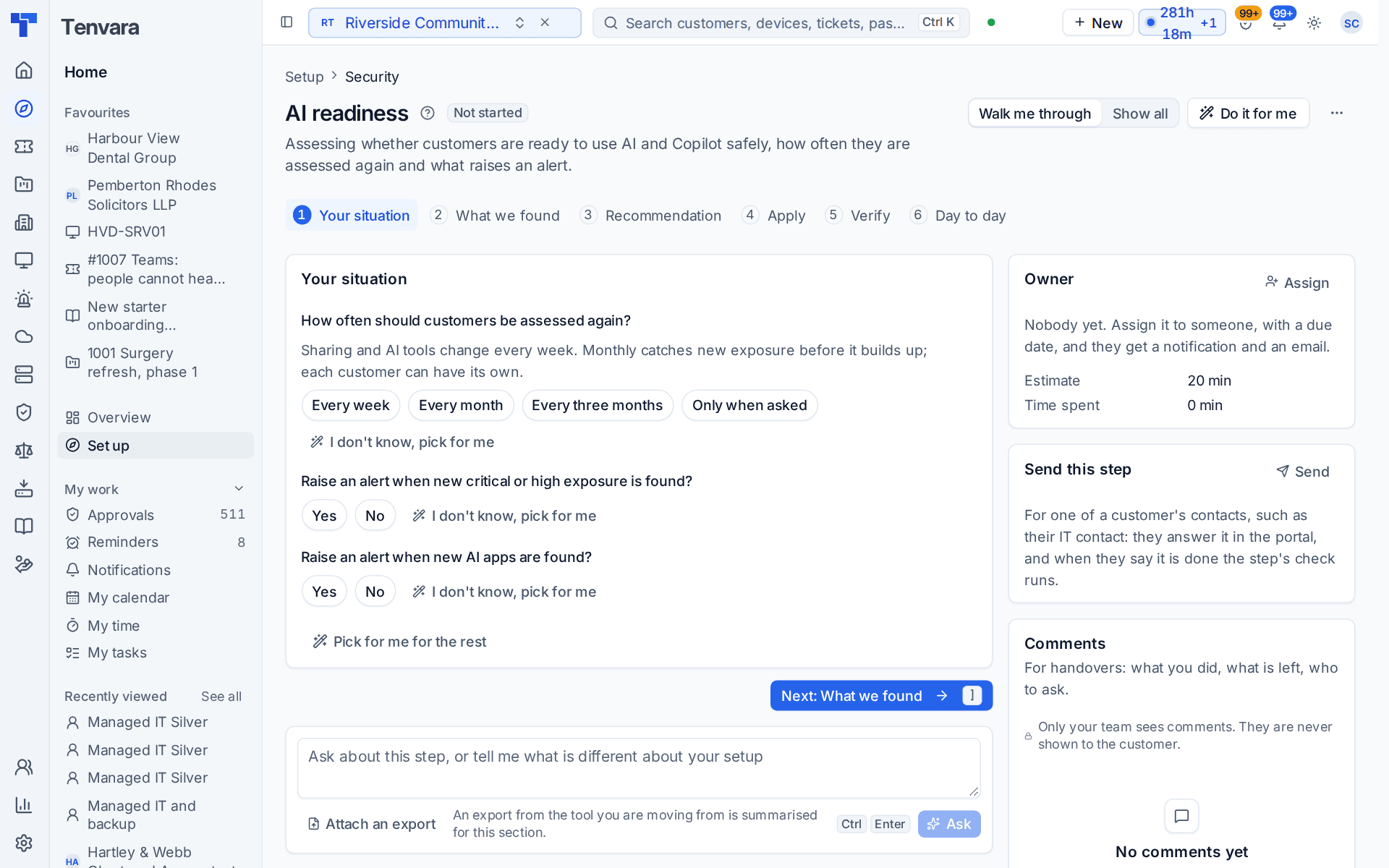
This section of the setup helper gets AI readiness assessments running on a schedule: whether each customer is ready to use AI and Copilot safely, how often they are assessed again and what raises an alert. It sits in the Security phase and takes about 20 minutes.
Open it from Home > Set up, then AI readiness. It runs through the same six beats as every section: see Working through a section.
Before you start
- Finish Company, brand and regional first. Until then the section shows Blocked.
- An assessment reads a customer's Microsoft 365 tenant, so the tenant has to be connected with the AI readiness feature ticked on its Features tab. See Microsoft 365 for the setup section that connects tenants.
- The section is in your plan when discovery says you work with Microsoft 365 licensing or provide security. Otherwise it is listed as not needed, with the reason.
What it reads from your data
What we found shows:
- customers assessed;
- customers with Microsoft 365 connected;
- critical findings open;
- how often customers are assessed again today.
The questions it asks
| Question | Choices | Pick for me |
|---|---|---|
| How often should customers be assessed again? | Every week, every month, every three months, or only when asked | Every month |
| Raise an alert when new critical or high exposure is found? | Yes or no | Yes |
| Raise an alert when new AI apps are found? | Yes or no | Yes |
Sharing and AI tools change every week. Monthly catches new exposure before it builds up, and each customer can have its own schedule.
What it recommends and why
There is one recommendation:
- Assess customers again on a schedule, and alert on what is new. The schedule and both alerts are saved as the defaults for every customer.
- If you chose Only when asked, it reads "Assess customers only when someone asks, and alert on what each assessment finds."
Press Apply when the preview is right. An apply can be undone for 7 days.
Note: This section sets the schedule and the alerts. It does not run a first assessment for you: open a customer and run one, as below, so the checks have something to read.
Checking it worked
Verify runs three live checks:
- At least one customer has been assessed. If none has, open a customer, choose AI readiness and press Run now.
- Customers are assessed again on a schedule. It warns when customers are only assessed when someone asks, because new exposure can then go unnoticed.
- No assessed customer is more than three months out of date. It counts the customers whose last assessment is older than that.
Day to day
- Open a customer, go to its Security tab and choose AI readiness. Run now gives the score, the sections and what to fix first. The report goes to the customer as a PDF or in their portal.
- Fix with approval sends sharing, guest and app consent fixes to the customer's approver. The next assessment confirms them, and the remediation project closes its tasks.
- Security > AI readiness shows every customer side by side. The scoring, alerts and the AI tool catalogue are in Settings > AI readiness.
Related guides
Was this page helpful?
Thanks for the feedback.