Device names, hostnames and renaming the computer
The difference between the name you give a device and the computer's own hostname, how both show up and are found, group rules on either, and renaming the machine itself through its agent with an approval.
Every device in Tenvara has two names. The hostname is the computer's own name, the one Windows, macOS or Linux reports. The name is what you call it, such as Main server or Reception PC. Keeping them apart means a name you choose is never overwritten by the next inventory, and a machine's real hostname is never hidden.
The name and the hostname
- The name is set in Edit (
E) on the device page. Nothing the device reports ever changes it. A device with no name of its own is shown by its hostname. - The hostname comes from the agent on every inventory and enrolment, and from mobile device management for phones. Once anything reports a device, its hostname is read-only in Tenvara. A device you added by hand that nothing reports keeps an editable hostname.
The device page shows the name as its title, with the Hostname read-only under it and Rename the computer too beside it.

Everything that names a device uses its name: lists, page titles, breadcrumbs, alerts and their emails, tickets, the device's history, notifications, reports, pickers and the customer portal. Lists show the hostname in grey beside the name, and search and Cmd+K find the device by either.
Tip: Give names to machines whose hostnames say nothing, such as nine phone system servers that all call themselves the same thing. Each keeps its own name in Tenvara whatever the machines report.
What the history says
The device's Activity tab records both kinds of change:
- a rename by a person, for example IPPBX is now called pbx-north;
- a hostname the device reports that differs from the last one, for example Hostname reported as IPPBX, was pbx-north, once per change. A change of upper and lower case only is the same name.
Device groups on name or hostname
Device group rules can match either:
- Name matches the name the device is shown by: its own name, else its hostname.
- Hostname matches the computer's own hostname, full or short, whatever the device is called.
Both take patterns with * and ?, separated by commas, in any case. Because a Name rule follows the name you set, a renamed device never drops out of its group when its hostname changes. The group editor shows Name and Hostname side by side, and the group's Who is in it says which one each rule uses. See Device groups.
Renaming the computer itself
When you really want the machine's own name changed, Rename the computer too asks the agent to do it. It is beside the hostname on the device page and in Edit.
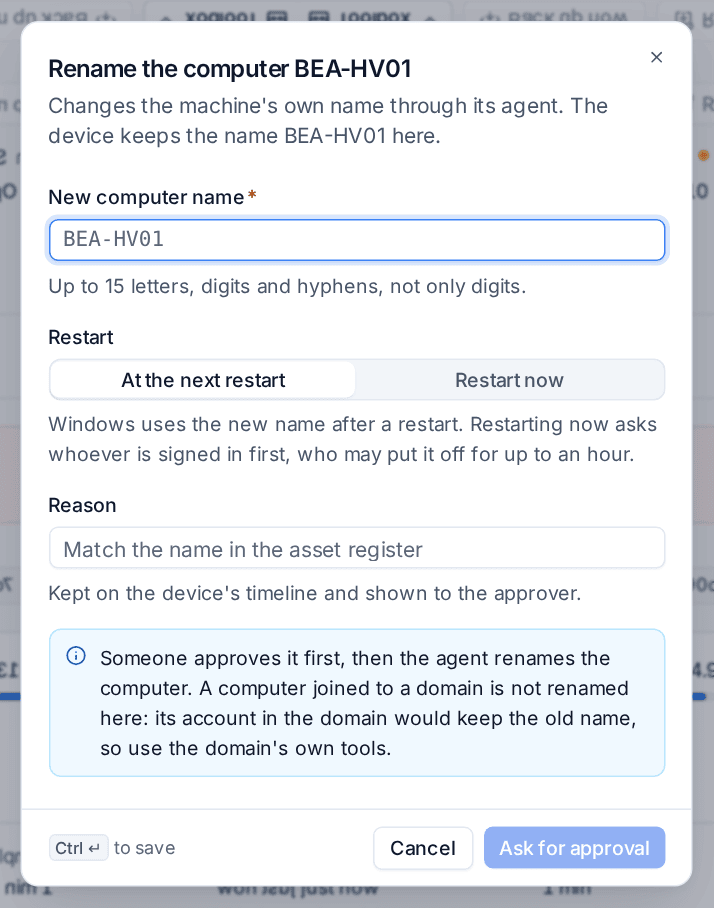
- Click Rename the computer too.
- Type the New computer name. The dialog checks it as you type: on Windows up to 15 letters, digits and hyphens, not only digits; on Linux up to 63 letters, digits and hyphens. A name may not start or end with a hyphen.
- On Windows, choose Restart: At the next restart or Restart now. Windows uses the new name after a restart. Restart now asks whoever is signed in first, and they may put it off for up to an hour.
- Give a Reason. It is kept on the device's timeline and shown to the approver.
- Click Ask for approval.
Someone approves it first, through the approvers named in Settings > Approvals, and then the agent renames the computer. The device's history records the request, the decision and the result, for example The computer DESK-07 is renamed to RECEPTION-01 from its next restart, and the audit log keeps the same. A device that is offline gets the request when it comes back, for up to three days.
On Linux the new hostname is reported at once. On Windows it arrives with the inventory after the restart. Either way the history then says Hostname reported as ..., and the name you gave the device in Tenvara stays as it was.
When a rename is refused
- A computer joined to a domain is not renamed here: its account in the domain would keep the old name. Rename it with the domain's own tools. The dialog says so, and the agent refuses with the reason if it is tried.
- Devices on the Lite agent, devices added by hand and devices reported only by an integration do not offer Rename the computer too.
- An agent that is too old to rename says which version can, so you can update it first.
Who can rename computers
Renaming needs manage rights on devices and the role permission Rename computers, which the built-in administrator and technician roles have. Change it in Settings > Roles and permissions. See Roles and permissions.
Related
Was this page helpful?
Thanks for the feedback.