Restoring SQL Server databases and point-in-time restore
Take SQL Server log backups with a device's images, see each database's restorable window, and restore a database straight into its instance, as a new database or over the original, as an image has it or to any point in time.
Turn on log backups with a device's application-consistent images and a SQL Server database can be restored to any minute between its oldest image and its latest log backup. A restore goes straight into the instance, so nobody copies files or runs statements by hand.
What you need
- SQL Server 2012 or later. Express is supported.
- The device's backup takes Windows volume images (the default for Windows devices). See Application-aware and SQL Server backups.
- The backup helper runs as SYSTEM and needs a SQL Server login with either sysadmin, or db_backupoperator on each database it backs up and dbcreator to restore.
If SYSTEM lacks the rights, the helper says exactly which grant it needs. A restore into the instance then restores the database's files to a folder instead, and the job's log gives the grant to run and the statement to attach the files.
Turn on log backups
- For every device: Settings > Backup, the Defaults tab, under SQL Server turn on Take SQL Server log backups and set Log backup every (15 minutes by default, 5 to 60).
- For one device: open the device, Settings in its Backup section, then Applications > SQL Server log backups: As Settings, On or Off, and Every for its own interval (empty follows Settings).
Log backups cover every database in the full or bulk-logged recovery model. A database in the simple recovery model has no log to back up, so it restores as each image has it.
While log backups are on, images no longer truncate the logs, and the device's "A SQL Server log is growing" warning gives way to "Log backups up to" a time for each database. Log backups are kept, encrypted, as long as an image that needs them.
Use one tool for log backups
If a SQL Server maintenance plan or another backup product also takes log backups of the same database, each one it takes breaks Tenvara's chain: the records it backed up are not in Tenvara's log backups. Tenvara says when that happens with the alert SQL Server log chain broken, naming where the other backup went, and point-in-time restore stops at the break until the next image starts a new chain. Switching a database to the simple recovery model breaks the chain the same way.
Choose one:
- Tenvara takes the log backups: turn off log backups in the other tool. Its full and differential backups are fine.
- The other tool takes them: leave Tenvara's log backups off and set the device's SQL Server logs to Keep them, so images leave the logs alone.
See what can be restored
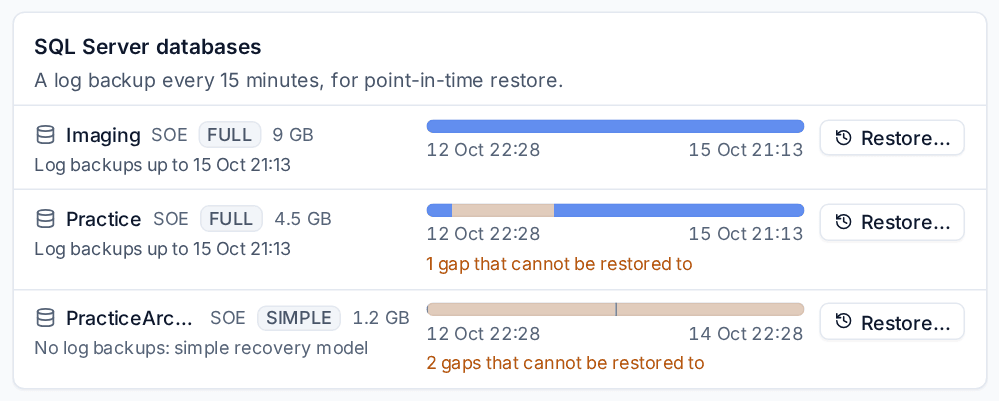
The device's Backup section has a SQL Server databases card. For each database it shows the recovery model and size, how far its log backups reach ("Log backups up to" a time, Log backups off, or No log backups: simple recovery model) and its Restorable window as a bar. A gap in the bar is a stretch that cannot be restored to, after a broken chain until the next image. A failing log backup or a broken chain is shown on the database, with the reason.
Restore a database
Press Restore... on a database in the SQL Server databases card. You need the Restore backups switch in your role.
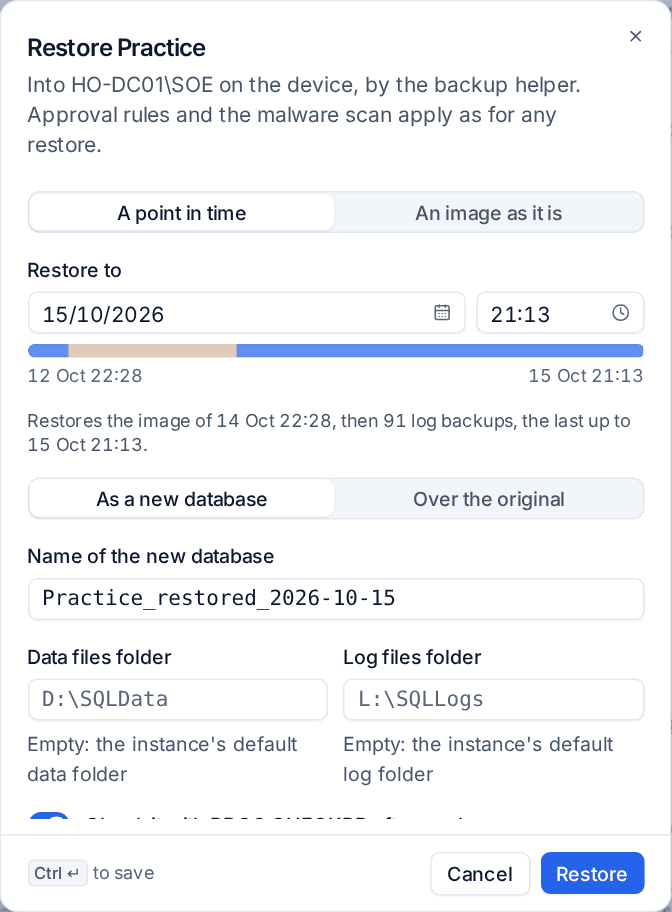
- Under Restore to, choose A point in time and enter the Date and time (anywhere inside the window, not in a gap), or An image as it is and pick the Image. For a point in time, the dialog says which image it starts from and how many log backups follow it.
- Under Restore as, choose:
- As a new database: the Name of the new database starts as
<database>_restored_<date>and can be changed. Leave Data files folder and Log files folder empty for the instance's default folders, or give folders of your own. The original database is not touched. - Over the original: type the database's name to confirm. Everyone is disconnected from it while it is restored. When the database is in the full or bulk-logged recovery model, a tail-log backup is taken first, so nothing written since the time you restore to is lost: it is kept with the other log backups.
- As a new database: the Name of the new database starts as
- Check it with DBCC CHECKDB afterwards is on for a new database and off for the original. The result is in the job's log.
- Press Restore, or Replace followed by the database's name when restoring over the original.
You can also restore an image as it is from the recovery points: hover a recovery point of the volume, press Restore a SQL Server database, choose the Database and Into the instance.
Note: DBCC CHECKDB needs sysadmin. With dbcreator alone SQL Server refuses the check, and the job's log says it could not run and gives the
DBCC CHECKDBstatement to run yourself.
Approval, the malware scan and the job
A restore into the instance is a restore like any other, so your restore approval rules apply. A restore over the original replaces what is there: when Restores that replace what is there is on, the dialog asks Why and says another administrator approves it before it runs. The malware scan reads the database's files in the image first.
Follow the restore on its job in Backup > Jobs. Every step is in its log: the image, each log backup, the stop time, recovery and the CHECKDB result.
Alerts
Both alerts are Warnings in the Backup group of Alerts > Alert types:
| Alert | When | Clears |
|---|---|---|
| SQL Server log backups failing | Two log backups of a database failed in a row, so point-in-time restore stops at the last good one. | On the next good log backup. |
| SQL Server log chain broken | Another tool backed up or truncated the log, or the database went to the simple recovery model. | When the next image of the database is taken. |
Related
Was this page helpful?
Thanks for the feedback.