Where things moved in the new menu
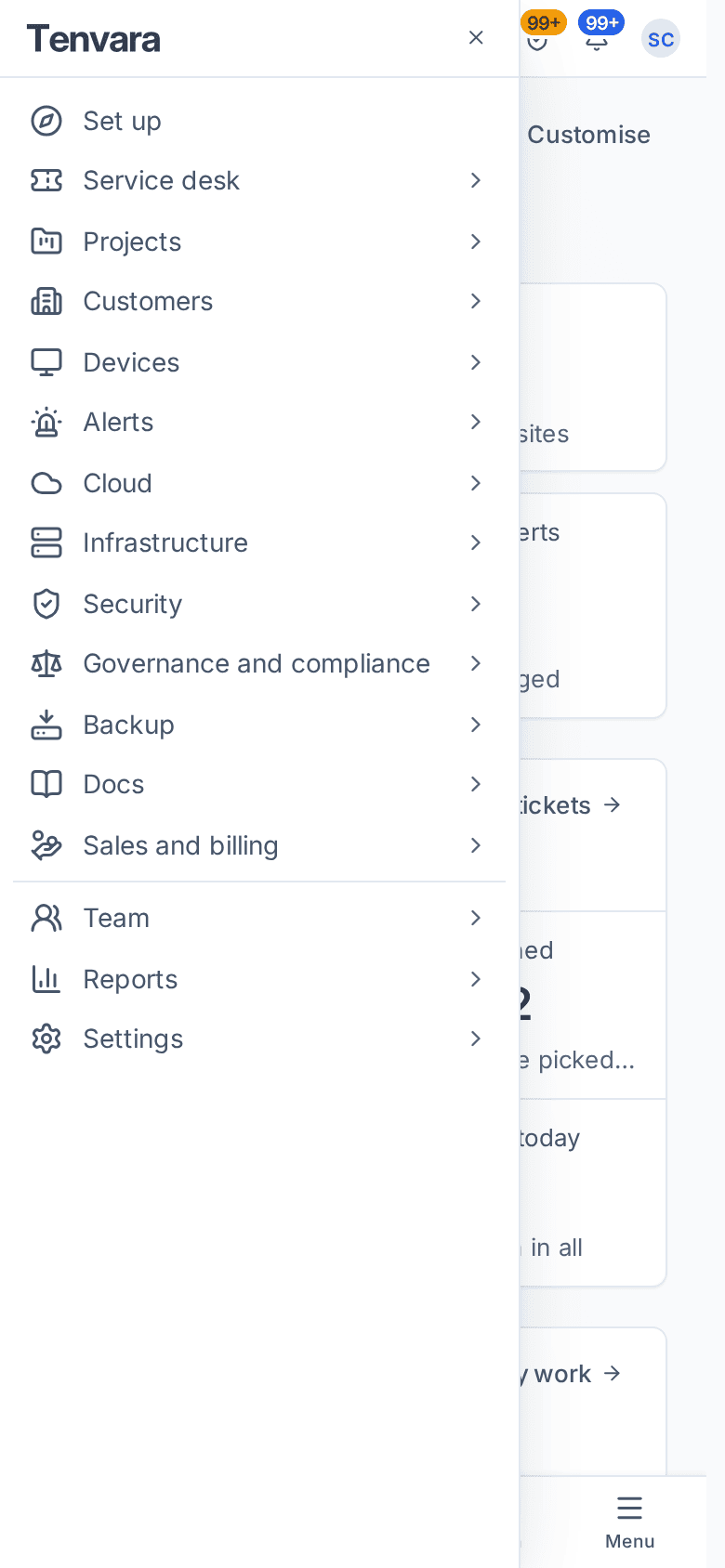
The menu now has 16 areas. A from-and-to table for every page that moved or was renamed, plus the Settings home, the command menu's names and the bottom bar on a phone.
Tenvara's menu was reorganised so that there are fewer places to look. The rail now has 16 areas, each with a sidebar in groups, and pages that belong together share one page with tabs. Nothing was taken away: every page still exists, and old addresses and bookmarks redirect to the new place.
This page is for anyone who knew the old menu. If you are new, read Finding your way around instead.
The 16 areas
From top to bottom of the rail: Home, Service desk, Projects, Customers, Devices, Alerts, Cloud, Infrastructure, Security, Governance and compliance, Backup, Docs, Sales and billing, Team, Reports, and Settings at the bottom. Set up sits under Home on the rail until you go live, then lives in the Home sidebar.
These no longer have a rail icon of their own, because they joined another area:
| Used to be on the rail | Now in |
|---|---|
| Chat | Service desk > Chat |
| Schedule | Team |
| Microsoft 365 | Cloud |
| Connectivity, Domains, Network | Infrastructure |
| Endpoint | Security |
| Compliance | Governance and compliance |
| Automation | Settings, the group Automation and AI |
| Sales, Invoices, Billing, Licences, Procurement, Stock | Sales and billing |
How to read a menu path now
Guides write a place as Area > Page, then "the X tab" for a tab on that page: "Devices > Enrolment, the Installers tab". A settings page is Settings > Page, whichever group it sits in. A list's ready-made filters are views in its Views picker, with the most used ones in the sidebar too.
Home, Service desk, Projects and Customers
| Before | Now |
|---|---|
| Tickets (the rail area) | Service desk; Tickets is its first entry |
| Chat > Console, History, Ticket requests, Knowledge gaps | Service desk > Chat, tabs Console, Chat history, Chat ticket requests, Knowledge gaps |
| Tickets > Time | Service desk > Time (your own is Home > My time) |
| Tickets > Contracts, Billing > Contracts | Sales and billing > Contracts |
| Catalogue requests under Tickets | Service desk > Service requests, tabs To approve and In progress |
| Approvals | Home > Approvals (the top bar button stays) |
| Reminders, Notifications | Home > Reminders, Home > Notifications |
| Setup on the rail after go-live | Home > Health |
| Projects > Mine | Projects > All projects, the view My projects |
| Projects > Resource planning | Team > Resource planning |
| Customers, one list | Customers with Active, Onboarding, Inactive, All customers, Sites, Contacts, Departments, Sign-offs, Onboard a customer, Onboarding findings, Possible duplicates and Contacts to review |
| A customer's one long row of tabs | Two rows that follow the menu: Overview, Service, People and sites, Devices, Alerts, Cloud, Infrastructure, Security, Compliance, Backup, Docs, Commercial, then Activity and Settings |
Devices and Alerts
| Before | Now |
|---|---|
| Devices > Add devices, Installers, Waiting | Devices > Enrolment, tabs Enrolment tokens, Installers, Waiting for approval |
| Devices > Recordings, Quick support | Devices > Remote sessions, tabs Sessions, Quick support, Recordings |
| Devices > Stale review, Retired, Changes, Uptime | Devices > Lifecycle, tabs Stale review, Retired, Changes, Uptime |
| Devices > Phones, Mobile policies, Mobile enrolment, Apple Business Manager | Devices > Phones and tablets, tabs Devices, Policies, Apps, Enrolment, Apple Business Manager |
| Devices > Printers and its pages | Devices > Printers, tabs Deployments, Drivers, Discovery; and Devices > Secure print |
| Devices > Checks | Devices > Health; server and site checks are Infrastructure > Uptime checks |
| Devices > Network, Controllers | Infrastructure > Network, Infrastructure > Firewalls and controllers |
| The device page's sections | Tabs Overview, Tools, Policies, Hardening, Activity |
| Alert views Open and Needs attention | Open and acknowledged and Not yet acknowledged |
| Alerts > Maintenance | Alerts, the Maintenance windows tab |
Cloud, Infrastructure, Security and Governance
| Before | Now |
|---|---|
| Microsoft 365 > Users, Tenants, Findings and the rest | Cloud > the same name |
| Microsoft 365 > Reports | Cloud > Security reports, with a Report schedules tab |
| Microsoft 365 > Configuration | Cloud > Configuration backup, with a Changes to review tab |
| Microsoft 365 > Baselines | Cloud > Tenant baselines |
| Microsoft 365 > Intune, several pages | Cloud > Intune, one page with tabs Overview, Devices, Policies, Apps, Autopilot, BitLocker and LAPS, Templates, Bundles, Template updates |
| Microsoft 365 > Changes | Cloud > Changes, tabs Approvals and Scheduled |
| Infrastructure > Sites | Infrastructure > Websites |
| Certificates | Infrastructure > Certificates, one list with a Source filter |
| vSphere connections, Proxmox VE connections | Tabs of Infrastructure > Hypervisors |
| Domains > DNS zones, Record templates | Infrastructure > Domains, DNS zones, DNS templates |
| Connectivity | Infrastructure, the group Connectivity: Lines (with the Suggested lines tab), Phone systems, Outages and SLA |
| Endpoint > Requests, Rules, Report | Security > Admin elevation, tabs Requests, Rules, Report |
| Endpoint > Protection | Security > Tamper protection |
| Security > Suppressions | Security > Rules, the Suppressions tab |
| Security > Incidents, Reports | Security > Security incidents, Security > Security reports |
| Security > Syslog relays | Security > Sources, the Syslog relays tab |
| Docs > Dark web monitoring | Security > Dark web monitoring |
| Security > Management systems, Compliance, Cyber Essentials, Policy documents, Awareness | The Governance and compliance area: Management systems, Compliance frameworks, Cyber Essentials, Policy documents, Awareness training |
| Security > Audits and the registers | Governance and compliance > Audits and registers, a tab for each register |
Backup and Docs
| Before | Now |
|---|---|
| Backup > Deleted backups | Backup > Recycle bin |
| Backup > Deleted items | Backup > Restore, the view Deleted items |
| Backup > Pinned | Backup > Pinned restore points |
| Backup > Recovery | Backup, the group Recovery: Bootable machines, Boot checks, Standby machines, Bare metal |
| Backup > Portal activity | Backup > Self-service restores, the Portal activity tab |
| Docs > Templates | Docs > Record templates |
Sales and billing, Team and Reports
| Before | Now |
|---|---|
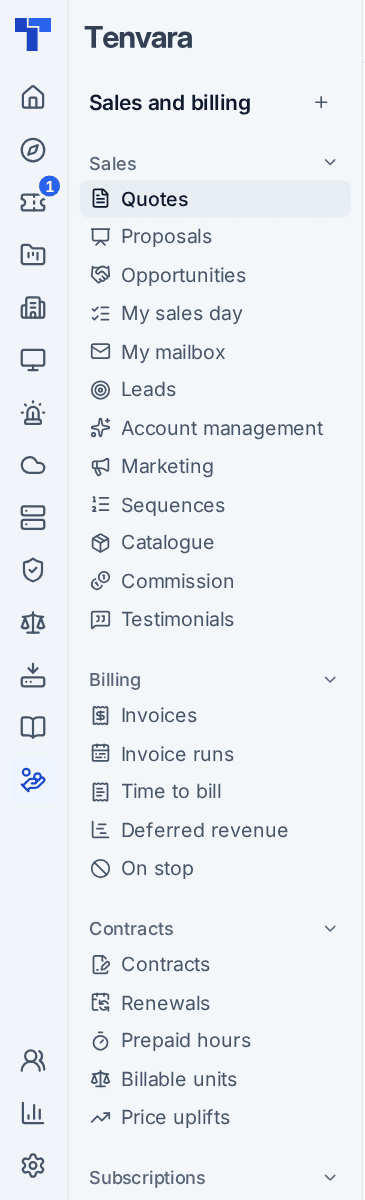
| Sales > Quotes, Proposals, Opportunities, Leads, Catalogue, Commission | Sales and billing, the group Sales, same names |
| Reports > Testimonials | Sales and billing > Testimonials |
| Invoices and its pages | Sales and billing > Invoices (views Drafts, Unpaid, Overdue, Queried, Credit notes), Invoice runs, Time to bill, Deferred revenue |
| Billing > Renewals, Prepaid hours, Billable units, Price uplifts | Sales and billing, the group Contracts |
| Billing > On stop | Sales and billing > On stop |
| Licences | Sales and billing > Licences, tabs By customer, Reconcile, Mapping, Changes |
| Procurement, Purchase orders, Stock, Suppliers | Sales and billing, the group Purchasing |
| Call billing pages under Connectivity | Sales and billing, the group Call billing |
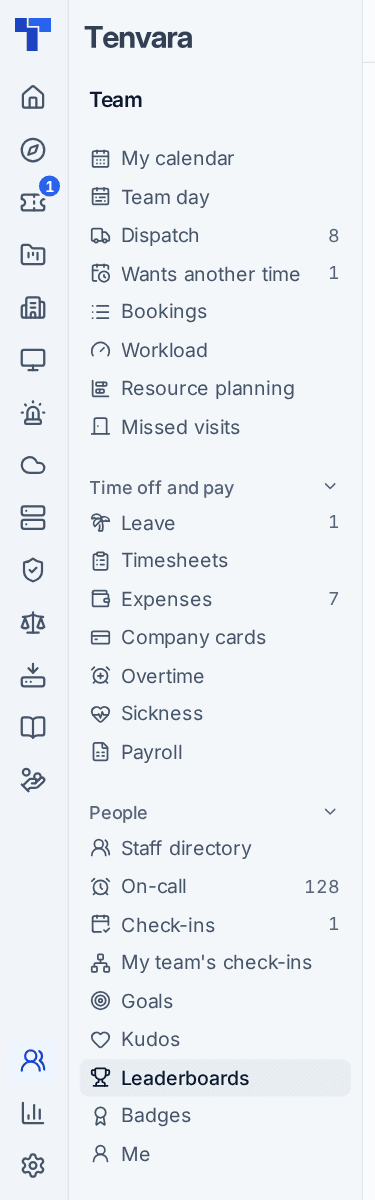
| Schedule > Your calendar | Team > My calendar (also Home > My calendar) |
| Schedule > Dispatch, Workload and the rest | Team, the group Schedule |
| Schedule > Leave, Timesheets, Expenses, Overtime, Sickness, Payroll | Team, the group Time off and pay |
| Schedule > Staff | Team > Staff directory |
| Schedule > On-call, Automation > On-call | Team > On-call, one page with tabs Rota, Pages, Calendar, Hours |
| Reports > TV dashboards | Reports > Dashboards, the TV dashboards tab; settings in Settings > TV dashboards |
Settings
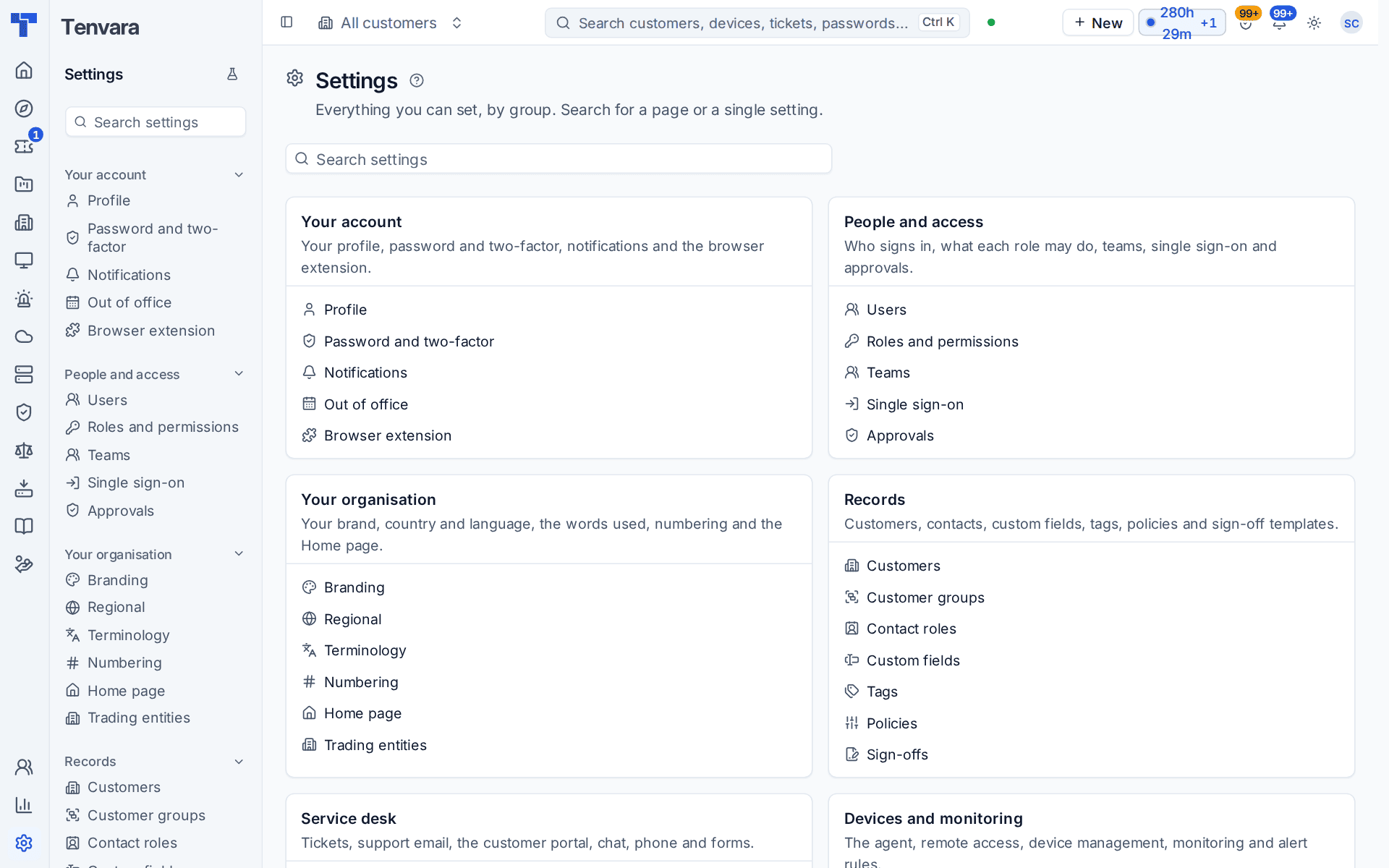
Settings now opens on a home page with a search over every page and every single setting, and a card for each of 14 groups. If you cannot find a page, type its old name or what it does into Search settings.
| Before | Now |
|---|---|
| Automation > Rules, Run log | Settings > Automation rules, Settings > Run log |
| Settings > Automation | Settings > Channels, tabs Channels, General, On-call |
| Settings > Diagnostics | Settings > System status |
| Settings > Security | Settings > Password and two-factor |
| Settings > Sign-in | Settings > Single sign-on |
| Settings > Email, Email templates | Settings > Support email, tabs Mailboxes and Email templates |
| Settings > Ticketing system | Settings > External PSA |
| Settings > Tickets | Settings > Ticket setup |
| Settings > Billing, Contracts | Settings > Billing rules, with a Contracts tab |
| Settings > Roles | Settings > Roles and permissions |
| Settings > Devices | Settings > Device lifecycle; agent settings are Settings > Devices and agent |
| Settings > Endpoint | Settings > Agent protection |
| Settings > Domains | Settings > Domains and DNS |
| Settings > Home | Settings > Home page |
| Settings > Import data | Settings > Migration; the sync log is Settings > Integrations, the Sync log tab |
| Settings > Developers, API keys | Settings > Developer API; Settings > Integrations, the API and limits tab |
| The AI tool catalogue page | Settings > AI readiness, the AI tool catalogue tab |
| Settings > Compliance, Cyber Essentials | Settings > Governance and compliance |
Every sidebar also ends with a settings link for its own area, such as Devices settings or Service desk settings, so you rarely need to start from the Settings home.
The customer portal
| Before | Now |
|---|---|
| Answers, Find an answer | Help centre |
| The catalogue requests page | The My requests tab of Tickets |
The portal's menu is grouped too: Get help, Needs you, My company, IT and devices, Security and compliance, Money and Me. See The customer portal.
The latest moves
Since the menu was first reorganised, a few more pages have moved or joined together. Old addresses redirect here too.
Infrastructure, regrouped
| Before | Now |
|---|---|
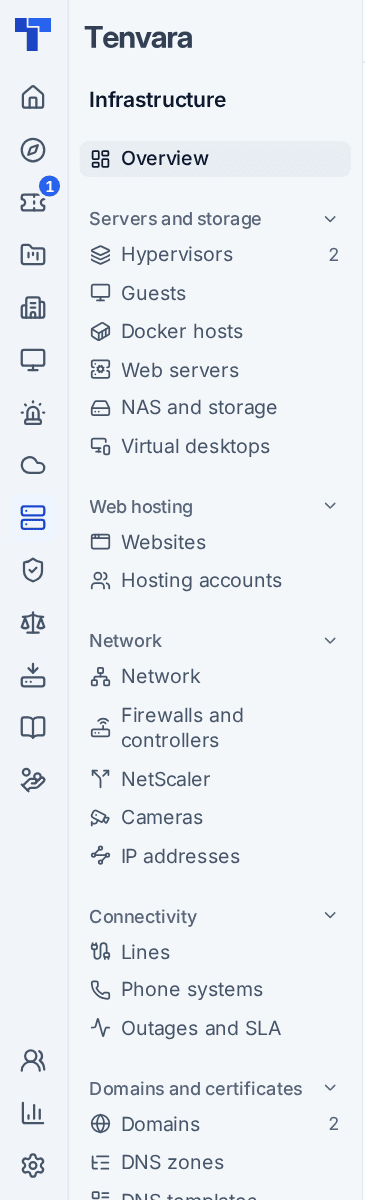
| The group Servers and virtualisation | Servers and storage: Hypervisors, Guests, Docker hosts, Web servers, NAS and storage and Virtual desktops |
| Infrastructure > Tasks (Proxmox tasks) | Infrastructure > Hypervisors, the Tasks tab |
| Infrastructure > WordPress | Infrastructure > Websites, the WordPress tab, beside All websites |
| Web servers in the Web hosting group | Infrastructure > Web servers, in the Servers and storage group |
| Infrastructure > Site certificates and Infrastructure > Domain certificates | One list: Infrastructure > Certificates, with a Source filter (website, domain or device) |
| The group Domains | Domains and certificates: Domains, DNS zones, DNS templates and Certificates |
| Infrastructure > Suggested lines | Infrastructure > Lines, the Suggested lines tab, beside All lines |
| Uptime checks in the Network group | Infrastructure > Uptime checks, in the Monitoring group |
| Cameras on their own | Infrastructure > Cameras, in the Network group |
| NAS units under Devices | Infrastructure > NAS and storage |
| Firewalls and controllers under Devices | Infrastructure > Firewalls and controllers, in the Network group |
Service desk, Customers, Devices and Cloud
| Before | Now |
|---|---|
| Convert to ticket in a chat, which ended the chat | Raise ticket: the chat carries on and the ticket gets everything said |
| Service desk views | New views On hold and Probably not support, shown in the sidebar when they hold tickets |
| Customers > All customers as the only list | Active, Onboarding, Inactive and All customers, four views of one list; Customers opens on Active |
| The customer scope, per browser | Per browser tab, with an Only bar and Show all customers |
| Deleting a device left the agent running | Deleting removes the agent; waiting removals are on Devices > Lifecycle, the Pending uninstalls tab |
| Devices > Remote sessions | A new Device web pages tab for your own web page sessions |
| Devices > Printers | A new Unmanaged queues tab |
| No page for apps in Microsoft 365 | Cloud > Apps across tenants (Enterprise apps in the Company edition) and Cloud > Sync timeline |
Security, Sales and billing
| Before | Now |
|---|---|
| Security > Vulnerabilities opened on its dashboard | It opens on To do, with Waiting on vendor, Not yet assessed and Hidden tabs; the dashboard is the Vulnerability overview tab |
| Sales and billing > Opportunities, the Follow-ups tab | Sales and billing > My sales day, with every sales task, not only those on deals |
| No CRM pages | My mailbox, Account management (tabs Suggested, Whitespace, Account plans), Marketing (tabs Lists, Newsletters, Attribution, Suppression list) and Sequences, MSP edition |
| Quotes view Not won held every decided quote | Not won for lost quotes and Closed for every decided one; the same for proposals |
| Licences listed ended subscriptions | Current subscriptions only, with Show ended for the rest |
Settings
| Before | Now |
|---|---|
| Every module on from the first day | A new install starts with the service desk; switch the rest on in Settings > Modules |
| Settings > Email for the customer email sender | Settings > Support email, which shows the one name every customer email is sent under, the portal's |
| The staff browser extension policy | Settings > Documentation, the Browser extension policy tab |
| The windows people see on their computers | Settings > Tray menu, the End-user experience tab |
| (new) | Settings > Mobile app, Settings > Sign-up addresses and, in the MSP edition, Settings > Outlook add-in |
| (new tabs) | Identity checks on Settings > Ticket setup, App watchlist and Approved apps on Settings > Microsoft 365, Out-of-hours providers on Settings > Channels |
Finding anything by name
Press Cmd+K (or Ctrl+K) and type. The command menu lists every page by its menu name, as Area: Page, and every tab and view under it: Devices: Software, Enrolment: installers, Tickets: unassigned. If you only remember the old name, type the thing itself ("installers", "on-call", "recycle bin") and pick it from the list.
On a phone
In a phone's browser there is a bottom bar with Home, Service desk, New, Search and Menu. Menu opens the menu of the area you are in, and All modules at its top lists the other areas.
Old links
Bookmarks, links in old emails and links in your own documentation that point at an old address still work: Tenvara sends them to the page's new place. Shortcuts follow the new areas: G then T for Service desk, G M for Cloud, G Q for Sales and billing, G U for Team and G G for Governance and compliance. Press ? on any screen for the full list.
Was this page helpful?
Thanks for the feedback.