Monthly restore drills
Once a month Tenvara restores a recent backup of one device per operating system family bare metal onto a sandbox disk filled with random data, reads it back and boots it. How drills are set, where the results show and what a failed drill means.
A boot check proves a backup boots. A restore drill goes further: it proves that a whole machine can be written back to an empty disk, byte for byte, the way a real bare-metal recovery would do it, and that the result still starts.
Once a month, for each operating system family your protected devices have (Windows Server, Windows (desktop) and Linux), Tenvara takes a recent backup of one of those devices and:
- Makes a new disk on a sandbox host, the size of the device's disk.
- Fills the whole disk with random data first, so nothing on it can pass for restored data.
- Writes the backup onto it with the same restore code the recovery media use. Every gap is written as zeros, free space included.
- Reads the whole disk back and checks it against what was written. A disk that does not read back as written fails the drill there, naming the stretch that differs, and nothing is started from it.
- Starts a machine from the disk on the sandbox host's isolated network and judges it exactly like a boot check: the guest agent, the Hyper-V heartbeat or the sign-in screen must prove the operating system is up.
- Removes the machine and its disk.
Each month the drill picks a different device in the family, the one drilled longest ago first, so over time every machine takes a turn.
Note: Drills need a sandbox host (a Proxmox VE node or Hyper-V host you manage) set up for boot checks. Until one is, no drill starts and file-level test restores carry on as usual. See Sandbox hosts.
Setting drills up
Drills are on by default. To change them:
- Open Settings > Backup and the Recovery tab.
- Under Restore drills:
- Monthly restore drills switches them on or off.
- From day of the month (1 to 28) is the first day a month's drills may run. They run inside the boot checks' window set further up the same tab, so they stay out of hours.
- Operating system families chooses which of Windows Server, Windows (desktop) and Linux are drilled.
- Press Save recovery settings.
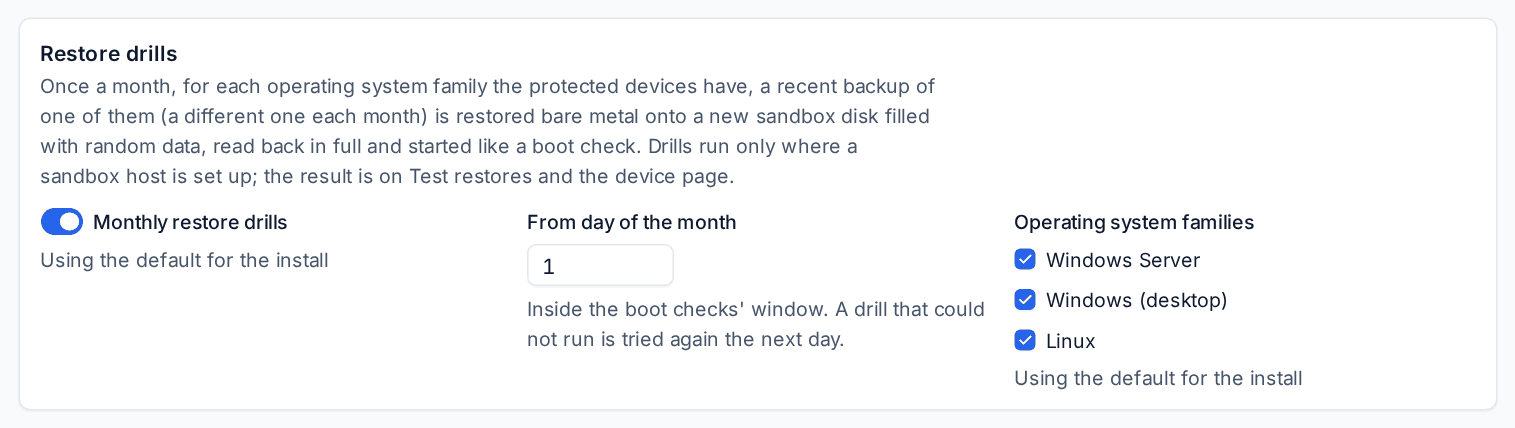
Each customer's families are drilled separately: a customer with servers and laptops gets a Windows Server drill and a Windows desktop drill each month. In the Company edition, it is your organisation's families.
A device qualifies when its system volume has a complete backup from the last 31 days. Virtual machines are left out: a virtual machine is restored as a virtual machine, not bare metal, and its boot checks cover it.
A drill that could not run (no sandbox host had room, no device in the family had a recent backup) is tried again the next day.
Where the results show
Backup > Test restores
The Restore drills card shows each family's newest drill: when it ran, the device, the sandbox host and the result. Drill now on a family starts its next device at once (if the sandbox host has room). Drills also show in the list as "Restore drill" rows, and count in the test restore figures, the test restore report (PDF), the monthly customer report and the portal like every test restore.
Open a drill row for its panel:
- Random data first and Backup written: how much was written.
- Read back: how many stretches of data and how many places of zeroed space were read back and matched.
- The boot: how long the operating system took to come up, and the picture of the screen.
- If it failed, The restored disk did not read back as written with the stretch that differs, or the boot check's own reason.
The device page
The device's backup section shows the newest drill of its family, with a link to The drill in Test restores.
When a drill fails
A failed drill raises one alert for the customer and family, as critical, linked to Test restores. It clears when a drill of that family passes.
- Did not read back as written: the restore wrote data that does not match. Run Drill now again; if it fails again on the same device, check the repository's health (see Repository health, healing and verification) and the sandbox host's storage.
- Did not boot: the image restores but the machine does not start. Look at the screen picture. Compare with the device's boot checks: if those pass and the drill fails, the difference is usually in how the disk is started, so check the device's disk layout and drivers before you need a real bare-metal recovery.
- Could not run for every drill of the month, for as many days as the boot checks' Alert when checks have not run for (days): a warning alert, because the family is not being tested. Usually the sandbox host is full or offline.
Tip: Drills read the backup and write only to a disk they made on the sandbox host. They never touch the device or the backup itself.
Related
Was this page helpful?
Thanks for the feedback.