What the antivirus did, closes that teach and Blind spots
How a detection says first what Microsoft Defender did, how test files close themselves, when a detection becomes an incident, why a close needs to say what it was, how the next detection shows the last close, rules proposed for lowering, AI triage and the Blind spots view.
A detection is only useful if it tells a technician what they need to decide. This guide brings together how Tenvara explains detections, learns from the way people close them, and shows where it cannot see at all.
What the antivirus did
A Microsoft Defender Antivirus detection opens with what Defender did, in plain words, before anything else: for example "Defender quarantined it 0.05 s later; it never ran (still a partial download)." Under it is where the file came from: "Downloaded from" the address, by which program, for which user. The same line shows wherever the detection is listed: an incident's detections, a device's, Home's.
The outcome sets the severity:
| What happened | Rated |
|---|---|
| Contained before it ever ran, from a download or an email attachment | Low, still recorded |
| Contained before it ran, from anywhere else, or contained with nothing saying whether it ran | Medium at most |
| Contained only after it had run | High at least |
| It ran, the clean-up failed, or it is still running | High at least, and opens again if it comes back |
| Defender has not said yet | As the rule rates it, until it does |
When Defender reports its action after the detection was recorded, Tenvara picks it up and rates the detection again quietly.
Test files close themselves
The EICAR test file and Microsoft's own SmartScreen and Defender demo files are labelled Test file, with the reason. Once Defender has contained one, Tenvara closes the detection as expected, with the outcome and where it came from in the close note, before any alert or incident. A test file that was not contained stays open and says so. A detection a person reopened is never closed again this way.
When a detection becomes an incident
An incident means a person needs to decide something. A critical detection, or a High one once known good, your own work and the antivirus's outcome have been applied, is an incident on its own; lower ones only when different kinds of behaviour about the same person, device or address come together. A detection that was explained, or lowered to Medium, is not High. See Incidents and response.
Closes that teach
Say what it was
Closing a detection asks What was it?:
- Real: actioned
- Expected: OneDrive sync
- Expected: our own work
- Expected: the user confirmed it
- Expected: vendor routine
- Expected or harmless
- False positive
- Duplicate
The close waits until one is picked. A High or critical detection closed as a false positive needs a note of real words (at least three words) saying why: "h" or "ok" is refused. A bulk close skips those with the reason and closes the rest, and an incident closed as a false positive is refused as a whole if it would take one with it.
Detections Tenvara closes itself say which rule or path closed them, for example "Closed automatically: the day's summary ended."
The next detection shows the last close
When the same thing happens again (the same rule, customer, subject and grouped values), the new detection opens with "Same as detection" and its number, how it was closed, by whom, when and their note, with a link. After two closes in a row that ended the same harmless way, it offers the known-good entry that would explain the next one, in one click, where the register can hold it. It is never offered for something that was real, for a console's alert, or to trust a person's own account.
Rules proposed for lowering
When people keep closing a rule's detections for a customer as noise, a rule with no real detection in the period is lowered one step for that customer. A rule with a real one, or one already at Low, is only proposed: the owner, then the administrators, are asked, and the rules list shows how many wait to confirm, with Lower it and Leave it. See Detection rules and suppressions.
AI triage
AI triage is optional and needs AI set up with your own AI provider key and the Security AI feature on (see Setting up AI). Where it is, Triage detections with AI is on by default, on the Response tab of Settings > Security monitoring. The AI is told what the antivirus did and what Tenvara knows: the person's devices, your offices, how the same detection was closed before, open tickets and planned work.
- A contained detection it calls likely benign is closed for the severities you allow (information, low and medium by default), with its reasons in the close note.
- A High one it calls likely benign shows AI: likely benign, waiting for review and waits at Medium for a person; a related detection puts it back to High at once.
- A lone High waits up to two minutes for the verdict before its incident opens and on call is paged.
- A critical is never lowered, closed or held.
Blind spots
A rule with nothing to read says "ok" and finds nothing. Security > Rules, Coverage tab, Blind spots lists rules that cannot fire because their events never arrive, customers with Intune computers and no agent, tenants whose risk detections, audit log or sign-in logs are not collected and why, security consoles delivering late, and rules that have never matched. Each line links to its fix.
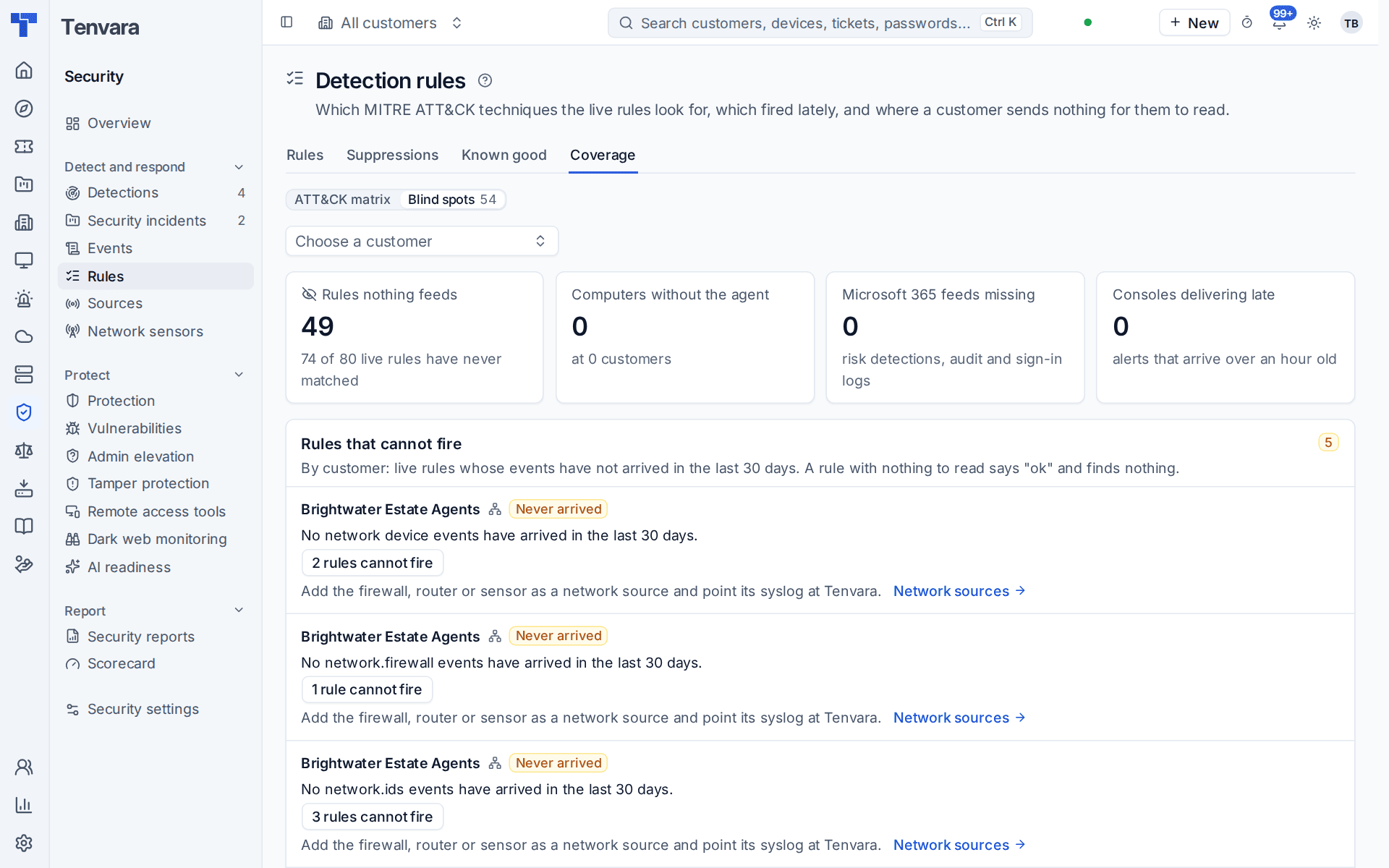
Each rule's page also says when it last read an event and when it last matched. See Threat intelligence and MITRE coverage.
A security console delivering late
A connected console that delivers alerts more than an hour after it raised them looks healthy while its alerts arrive looking new. Tenvara raises Security console delivering late for that console and customer, with how many and how late and whether the delay was the console's own, and marks each detection with its delay. It closes after a day with nothing late. See Integrations and alerting.
Quieter, truer rules
Several built-in rules now judge what they see with more care:
- Sign-ins to a web app a server publishes no longer raise "Windows logon from an internet address"; remote desktop, file sharing and remote administration from the internet stay High.
- Impossible travel only when it could be travel. A new country is Medium unless something follows it, and countries are remembered for 90 days.
- SSH brute force is one detection per server per day, listing the sources and countries; a sign-in that works after the failures is critical.
- Calendar shares and Exchange's own system mailboxes are information, not "Mailbox permission granted".
- Three Microsoft 365 detections: files deleted from SharePoint or OneDrive at volume, a burst of links and invitations to outsiders far above the person's usual, and a sign-in Microsoft ties to a token replayed through a proxy. Each is Medium, and High only for what makes it serious (an emptied recycle bin, a leaver, a session seen on a second network).
Was this page helpful?
Thanks for the feedback.