Company rules, changes and tickets for vulnerability fixes
Set once which vulnerability fixes need a change, who approves, when fixes may run, blackouts, freezes and the emergency route, then raise changes and tickets from a response that follow the work and close themselves.
Most customers have rules about what may change on their systems and when: servers only at weekends, nothing over Christmas, the finance system only with someone's OK. Company rules for fixes write those rules down once, and every vulnerability response follows them before it sends anything.
Setting the rules
Go to Settings > Vulnerabilities and find Company rules for fixes. These are the rules for every customer. A customer can have its own on its Settings tab, under Company rules for fixes: each part either follows the company-wide rule or is the customer's own (the Own rule switch), and what the customer page shows is exactly what applies.
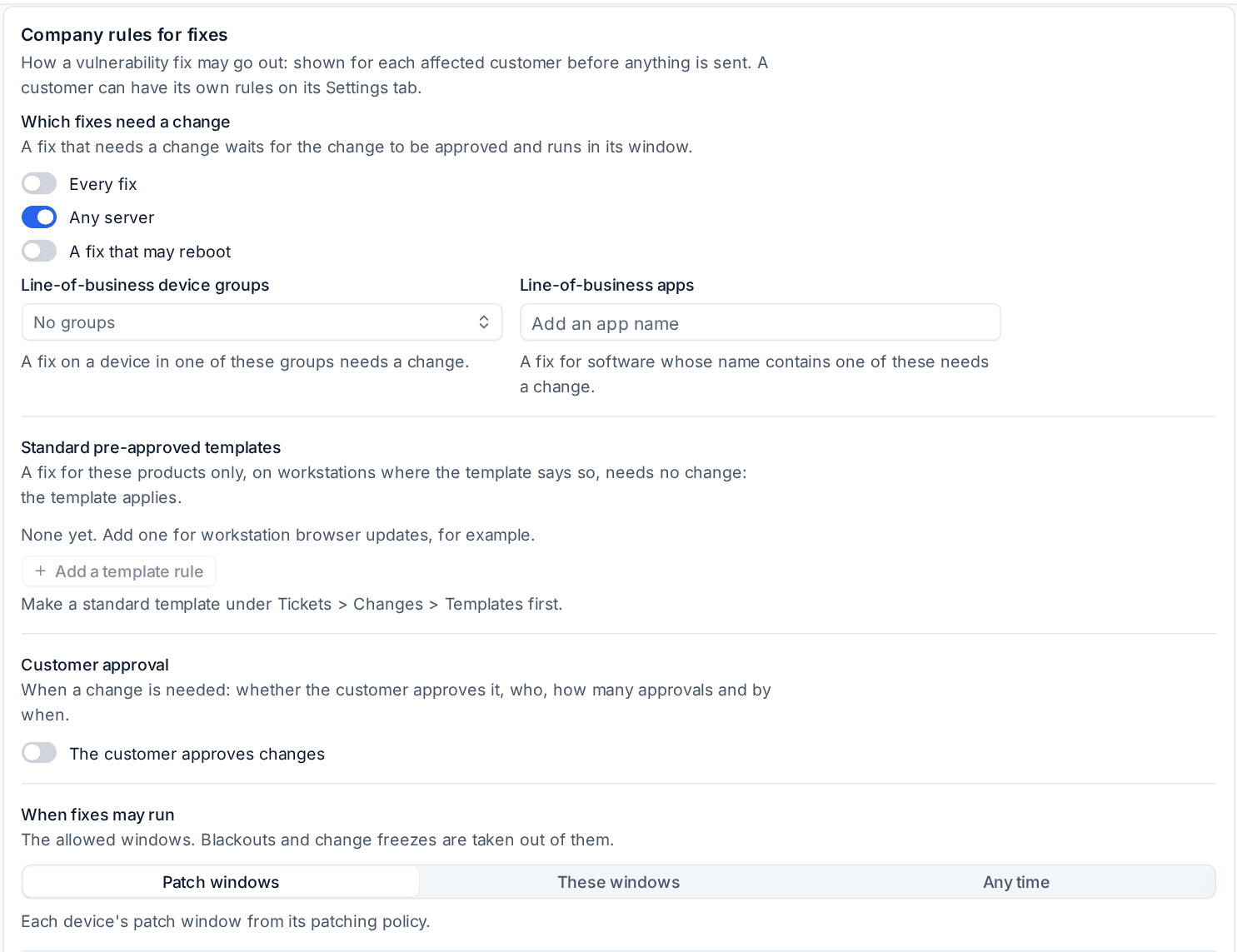
- Which fixes need a change: Every fix, Any server, A fix that may reboot, devices in Line-of-business device groups, and software whose name contains one of the Line-of-business apps. A fix that needs a change waits for it to be approved and runs in its window.
- Standard pre-approved templates: a fix for these products only, on workstations where the template says so, needs no change because the template applies (for example browser updates on workstations). Make the standard template first (on the Changes tab of Settings > Ticket setup, under Change templates), then Add a template rule. A template covers a response only when every product it fixes is in the list.
- Customer approval: The customer approves changes, which contacts, how many approvals are needed and by when.
- When fixes may run: Patch windows (each device's own, from its patching policy), These windows, or Any time. Blackouts and freezes are taken out of them.
- Emergency route: The customer agreed to emergency changes. A known-exploited or critical fix may then go as an emergency change, approved afterwards, even in a freeze.
- Tickets: how tickets tracking a fix are raised for the customer (see below), or Chosen on each response.
Under the rules, Blackouts and change freezes lists periods for every customer (office hours as a blackout, a freeze over the holidays or at month end), and a customer can add its own on its Settings tab. Special handling lists devices or groups that need care: an HA pair that goes one node at a time, a SQL cluster only with someone's OK, a server that must never restart on its own. Freezes and blackouts also show on the change calendar, behind the changes.
What the Fix tab shows
Above the platform groups on a response's Fix tab, each affected customer gets its rules in plain words: Change needed or No change needed, the earliest window the rules allow, the approvers the change will ask, and Frozen until a date when a freeze is in force. A customer's name links to its Settings tab. Nothing is sent until you have seen it.
Changes from a response
On a response's Change and tickets tab:
- Press Raise a change.
- Choose how many: one for the whole response, one per customer, or one per wave. Choose whether it is an emergency change (offered only when the customer's rules allow the emergency route), and write the rollback by hand if you want your own.
- Raise it. It is created in Service desk > Changes, already filled in and submitted for approval.
The change carries the response and its CVEs, the devices, a risk and impact worked out from the severity and what it touches (a domain controller or a cluster makes it high), the fix as the implementation plan, a rollback plan, the re-check as the test plan, and the earliest window every covered customer's rules allow. When every covered customer's rules name the same standard template, it is a standard change, approved as standard changes are.
Raise what the rules need raises one for each customer whose rules need a change. The rules also raise one by themselves the first time a rollout reaches a device that needs it. Link a change links one you made yourself.
The rollout waits for it
A device covered by a change gets its fix only once the change is approved and only inside its window. The tab says why each device waits, for example "Waiting for CHG-12's approval." or that the change's window has not started yet. A freeze in force holds the devices, unless the change is an emergency change, which goes now and is approved afterwards.
The change follows the work
The change moves to In progress when the first device starts, Completed when every device is fixed and verified, or Failed with the failures attached once its window ends. Roll back finishes it as rolled back. Each move is on the response's timeline. Raising changes needs Vulnerability response manage and Service desk manage. See Change management.
Tickets to track the work
Raise tickets on the same tab creates service desk tickets at the grain you choose:
| Grain | Tickets |
|---|---|
| One per device | A ticket for each device |
| One per customer | A ticket per customer with its devices |
| One per HA pair, cluster or server set | Every node of a server set on one ticket |
| One for the whole response | One ticket with every customer's devices |
| By the company rules | Each customer's own choice, from its rules |
Each ticket carries the CVEs, the devices and the fix, and links to the response and its change. Only devices that still need work and are on no open ticket of the response go on new ones, and a customer's ticket that is still open takes that customer's new devices. Link a ticket links an existing one.
Tickets look after themselves: an internal note as devices are queued, fixed and verified or fail (with the output), and they resolve themselves when every device on them is fixed, excepted or not affected. A mitigated device keeps its ticket open. When a device needs work again, a ticket the response resolved reopens; a ticket a person closed gets a note instead. Time is logged against them as usual, and they show on the customer's portal by the portal's usual rules. Raising tickets needs Vulnerability response manage and Service desk manage.
Note: In the Company edition there is one organisation: the rules are your organisation's, and changes and tickets are "one for your organisation".
Related: Due dates, exceptions and the vulnerability evidence report, Server sets.
Was this page helpful?
Thanks for the feedback.