Vulnerability triage, the daily digest and triage rules
Each day's new high, critical and known-exploited vulnerabilities that hit your devices, grouped by product and fixed version, with Open response, Ignore product and Snooze, the daily digest, and triage rules that fix the routine ones automatically.
Many new vulnerabilities are published every day, and a good share of them are rated high or critical. Most are for software none of your customers run. Triage cuts each day's list down to the handful that hit your devices and asks you to decide what to do with each.
Go to Security > Vulnerabilities, open the Responses tab and choose Triage (the row under it reads Responses and Triage).
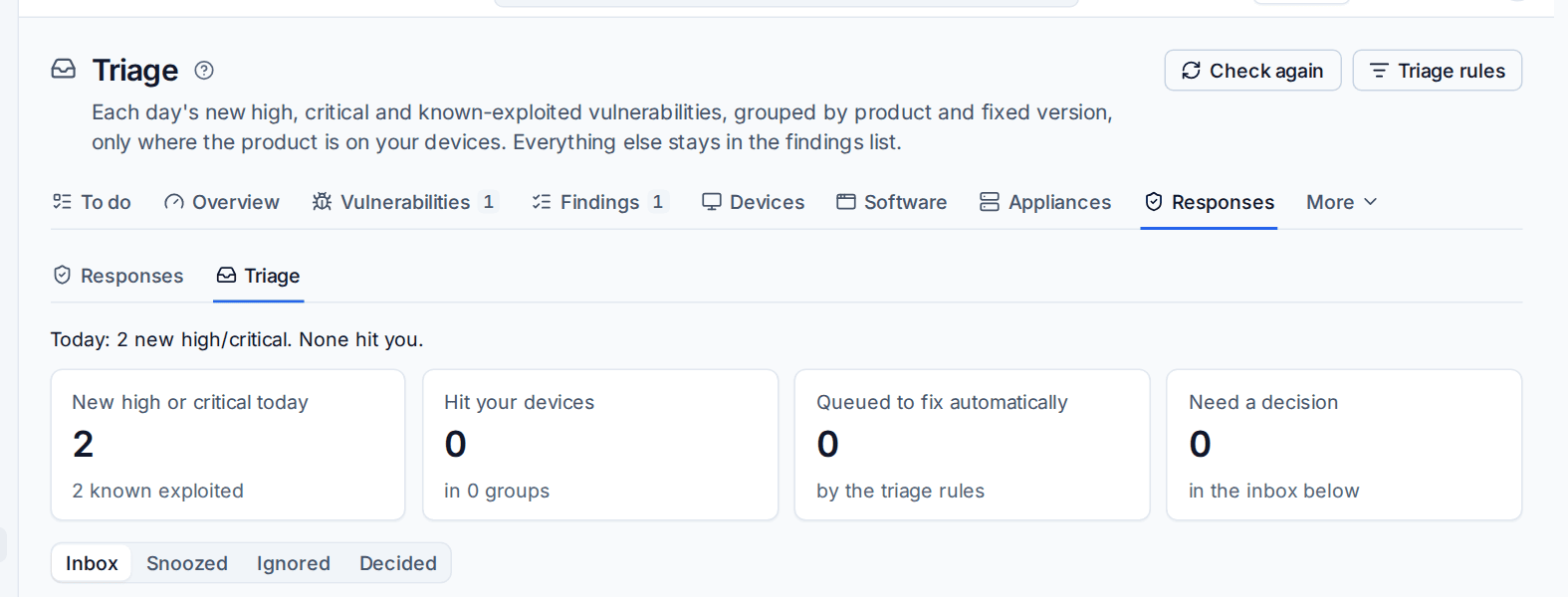
The day at a glance
The top of the page says the day in one sentence, for example "Today: 61 new high/critical. 6 hit you. 4 are queued to fix automatically. 2 need a decision.", then four figures:
- New high or critical today, with how many are known exploited.
- Hit your devices, and in how many groups.
- Queued to fix automatically, by the triage rules.
- Need a decision, in the inbox below.
Only vulnerabilities first published in the last 30 days count as new, plus any added to CISA's known exploited list that day, so mapping a product for the first time does not flood the inbox with years of old CVEs. Check again runs the day's triage now; it also runs after each day's feed refresh.
The inbox
Vulnerabilities are grouped by product and fixed version, and only for products that are on your devices. One card might read "14 nginx (Ubuntu 24.04 LTS) CVEs, all fixed in 1.24.0-2ubuntu7.6, 9 devices across 4 customers, apt route available on 8 of 9". Each card shows the severity, whether any is known exploited and its due date, the route a fix can take (apt, dnf, Windows Update, Software Update, the software catalogue) and on how many devices, the exploit score, and the CVEs and devices behind a disclosure.
For each card:
- Open response opens a vulnerability response with the product below the fixed version as its condition, the CVEs, the severity and the due date. Opening it again gives the same response.
- Ignore product keeps the product out of the inbox until you stop ignoring it. Its vulnerabilities stay in the findings list.
- Snooze brings the card back on the date you choose.
The views are Inbox, Snoozed, Ignored (with who ignored each product and why, and Stop ignoring) and Decided. Everything you decide is in the audit log.
| Key | Action |
|---|---|
j / k |
Move between cards |
o |
Open a response |
i |
Ignore the product |
s |
Snooze |
New vulnerabilities join an open response
When a new vulnerability's fix is already covered by an open response (the same product, and a fixed version at or below the one the response installs), it joins that response instead of waiting in the inbox: its CVEs are added and the response's timeline says so. A response opened for Ubuntu's nginx never takes Debian's.
A technician limited to some customers sees only their devices and counts.
The daily digest
After each day's feed run, everyone who works vulnerability responses gets the digest, in the app and by email, with their own customers' counts: the same sentence as the top of the page, then the groups that need a decision. A day with nothing new sends none. Switch it off with Daily triage digest under Alerts in Settings > Vulnerabilities; each person can choose how they receive it in their notification settings.
Triage rules
Some fixes are routine: a browser update, a new Zoom client. A triage rule handles them for you: "when a new high or worse vulnerability appears for a product in this list, open a response with the automatic route, in the next patch window, canary first".
- Go to Settings > Vulnerabilities and find Triage rules (or press Triage rules on the Triage page).
- Press Add rule.
- Choose the products (search for them, or name a Linux package for every release), the lowest severity (high or critical), and whether only known-exploited ones count.
- Choose the rollout: the canary (one device, one customer, or none), the window (the next patch window, or now), the wave size and when a wave stops.
- Save.
After each feed run, the first rule that covers a waiting group opens its response, finds the devices, plans the fix and starts the rollout through the automatic route. The response's timeline names the rule as the one that opened it.
Rules never send fixes to servers. Every server, and every member of a server set, is taken out of what the rule sends and waits on the response ("Waiting for a person: rules never send fixes to servers") for someone with Run vulnerability fixes on servers to send from the Fix tab, where the server sets' approvals apply. If the rule cannot start the rollout (one is already running for that group, or nothing is left to fix), the response is still opened and its timeline says why the fix waits for a person.
Changing triage rules needs Open vulnerability responses and Run vulnerability fixes. With no rules, every group waits in the inbox for a decision.
Tip: Start with one rule for the browsers and common desktop apps on workstations, canary first. Watch a few days of the timeline before you add more products.
Related: Company rules, changes and tickets for vulnerability fixes, Vulnerability priorities, fix states and To do.
Was this page helpful?
Thanks for the feedback.