Storage keys: the runtime key and the set-up key
Why the key Tenvara stores for an S3 storage location should only be able to back up, how the location check proves it and guides you through the swap, when a one-off set-up key is asked for, and what Backblaze B2 needs.
An S3 storage location needs an access key. Whoever holds the key the backup server stores holds what that key can do. If it can lift an Object Lock, change the bucket's rules or erase old versions, then ransomware that takes the server can erase the backups too.
So Tenvara splits the keys:
- The runtime key is the one stored for the location. It can write, read, list, hide and re-lock backups, and nothing more: it cannot lift a lock, change the bucket's rules, erase a version or delete the bucket.
- The set-up key is the bucket's administrator key. It is used only when a set-up step needs to change the bucket, for that one request, and it is never stored or logged.
Day-to-day backups, second copies, lock renewals, maintenance and restores all run on the runtime key alone.
How Tenvara checks the key
When a location is saved, when you press Check, and once a day, Tenvara checks what the stored key can do, safely (the checks cannot change the bucket):
- whether it can bypass a governance lock;
- whether it can write the bucket's lifecycle rules;
- whether it can delete a version.
On Backblaze B2 the key's capabilities are read from B2 directly, which writes nothing.
If the key can do more than backups need, the location's card in Settings > Backup, Storage tab, shows This location's key can do more than the service needs, with what it can do ("Change the bucket's lifecycle rules, so it can make the bucket delete old versions") and Swap to a runtime key.
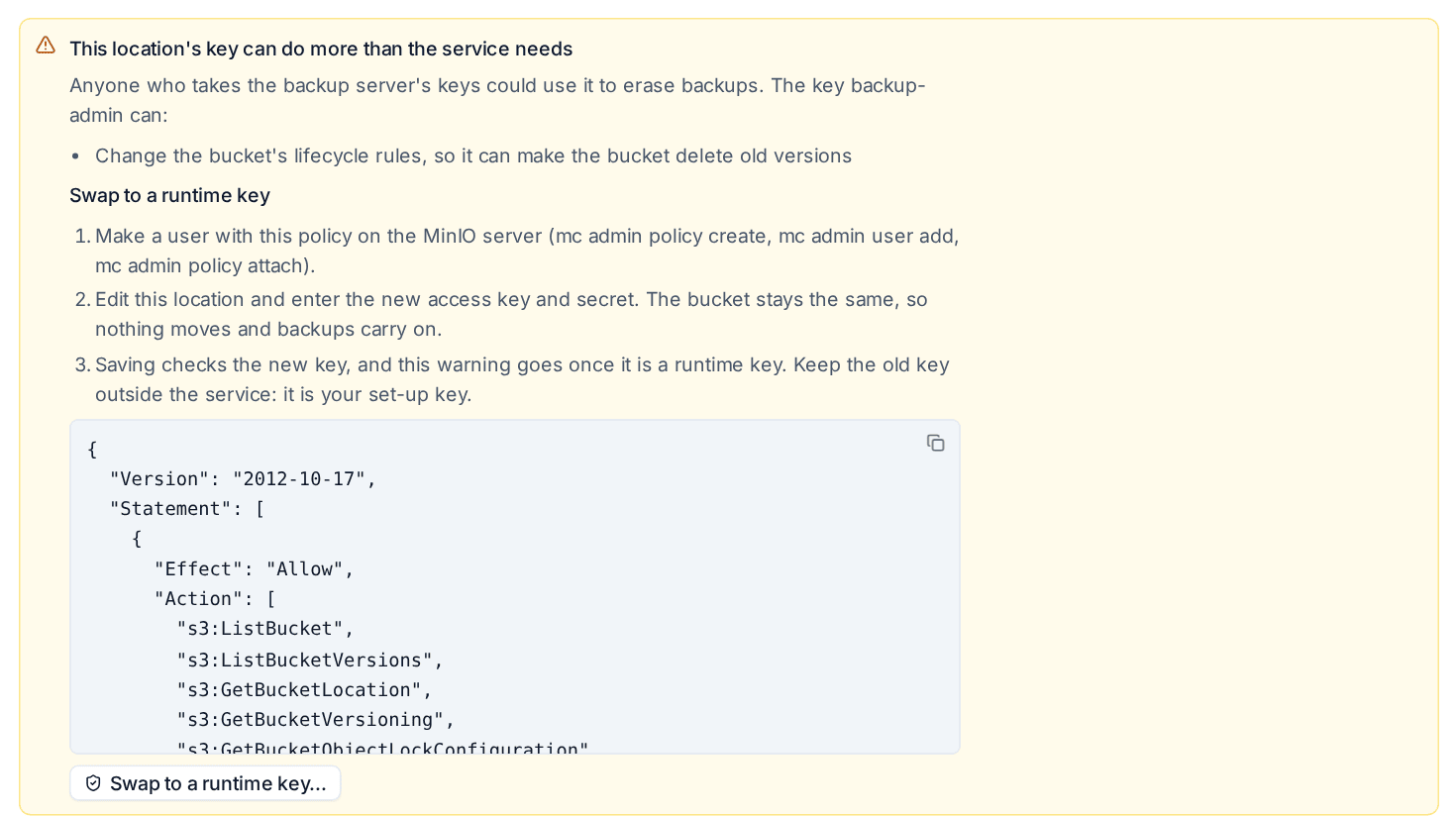
Swapping to a runtime key
The card gives the steps and the exact policy for your provider and bucket, ready to copy.
- In your storage provider, make a new key (a user with the policy attached) with exactly the runtime policy the card shows:
- MinIO: create the policy and a user, then attach the policy to the user (
mc admin policy create,mc admin user add,mc admin policy attach). - AWS S3: an IAM user with the policy as an inline policy, and an access key for it.
- Wasabi: Policies > Create policy with the same JSON, a new user with it attached, and its access key.
- Backblaze B2: an application key restricted to the bucket with the capabilities the card lists (list, read and write files, delete files, read bucket and file retentions, write file retentions). Never give it write buckets, write bucket retentions or bypass governance.
- MinIO: create the policy and a user, then attach the policy to the user (
- In Settings > Backup, Storage, edit the location and enter the new access key and secret. The bucket stays the same, so nothing moves and backups carry on.
- Save. The check runs with the new key and the warning goes once it is a runtime key.
- Keep the old key outside Tenvara, for example in your password vault. It is now your set-up key.
Tip: Do the swap for every S3 location, copy locations included. A copy location with a full-access key is just as exposed as the primary.
When the set-up key is asked for
Some steps change the bucket itself:
- adding a new S3 location whose bucket lacks the rules backup needs;
- the delete-marker lifecycle rule (on AWS, MinIO and Wasabi) or the hidden-file rule (on Backblaze B2) when the check finds it missing;
- switching device backups to locked storage, which turns on versioning and Object Lock or makes the locked bucket beside the store.
The checks only read: when a rule is missing the card says Needs the set-up key once, with the exact rule. Enter the set-up key in the Set-up key box (it says plainly it is never stored or logged), and Tenvara makes that one change. The activity line records that a set-up key was used, never the key. You can also add the rule by hand in your provider's console instead.
Without a set-up key, a change that is still needed is refused with what it needs; nothing else is affected. A bucket that was made locked in the first place needs no set-up key at all.
Backblaze B2
Tenvara recognises the provider of each S3 location from its address (Backblaze B2, Wasabi, Cloudflare R2, Amazon S3 or MinIO) and the card says which, for example "S3 bucket on Backblaze B2".
B2 does not use S3 lifecycle rules. Without B2's own lifecycle rule, files hidden by maintenance (every pack it deletes) are kept and billed for ever. Tenvara reads the bucket's B2 lifecycle settings and:
- says nothing when a rule already covers the location's prefix;
- asks for the set-up key once to add a rule that deletes hidden files after 1 day for that prefix, beside the bucket's other rules (a wider rule of your own is never changed);
- or gives you the console steps: Buckets, Lifecycle Settings, a custom rule for the prefix with Days till delete 1.
One day is safe with Object Lock: a locked version is kept for its whole lock period whatever the rule says.
On Cloudflare R2, which has no versioning or Object Lock in the S3 sense, the card says so rather than warning about it. On Wasabi, the card notes Wasabi's minimum storage duration, which bills deleted packs until it ends.
Locations with no lock in compliance mode
The Storage tab also names the repositories kept where no location is locked in compliance mode (governance only, or no lock), with links. See Storage locations and immutable backups and Object Lock renewals and a lock that is off.
Related
Was this page helpful?
Thanks for the feedback.