Who gets told: the routing chain
How Tenvara makes sure an alert, an incident or a missed SLA reaches a named person, in which order it tries people, and how to see and fix routing that reaches nobody.
Every part of Tenvara that needs to tell a person something urgent uses one routing chain. It is the same for a critical alert, a security incident, an SLA warning on a ticket nobody has, an alert nobody has picked up and an alert type lowered for noise. The chain exists for one reason: a problem that needs a person must never end up told to nobody because a role is empty, nobody is on call or a ticket has no assignee.
This guide reads the same in the Company edition, where "the customer's owner" is your organisation's owner.
The chain, in order
- Role holders. The active people who have the message's notification event switched on, by their own choice or their role's default. For a critical alert that is the Critical alerts event. See Notifications.
- On call. When the message pages (a security incident Tenvara opens, and a critical alert only when you switch that on), whoever is on call on your rota or escalation policy is paged as well. Steps 1 and 2 both run: a role holder hearing about it never stops the page.
- The customer's owner. The customer's technical lead, else its account manager (active people only).
- Every administrator. Everyone with the owner or administrator role who is active.
Steps 3 and 4 are the fallback. They run only when nobody was reached by the steps before, and stop at the first step that reaches someone. A named person is an active member of staff with an email address or a device that takes notifications.
If on call is held by out-of-hours cover ("wait for business hours"), that is a decision you made: the chain stops there and the history says the page is held until you open.
How a critical message is sent
A critical message goes to each person reached by email as well as by their own channels, and it is always in their notification inbox. Quiet hours do not hold it back. Anything below critical goes on the person's own channels for that event (their role's defaults until they choose).
Nobody gets more than 10 notifications a minute on any one channel. A copy held back by that limit still counts as reaching the person (it is in their inbox and in the summary that follows), so the limit never widens the chain to more people. See After an update: problems found and the email limit.
Seeing who was told
Every pass through the chain writes one line on the alert's, incident's or ticket's history, saying who was told, by which step and why the earlier steps reached nobody. For example:
Told Sam Taylor (every administrator): nobody holds NOC security analyst and there is no on-call rota.
Paging whoever is on call
What pages on call is set under Paging whoever is on call on the General tab of Settings > Channels.
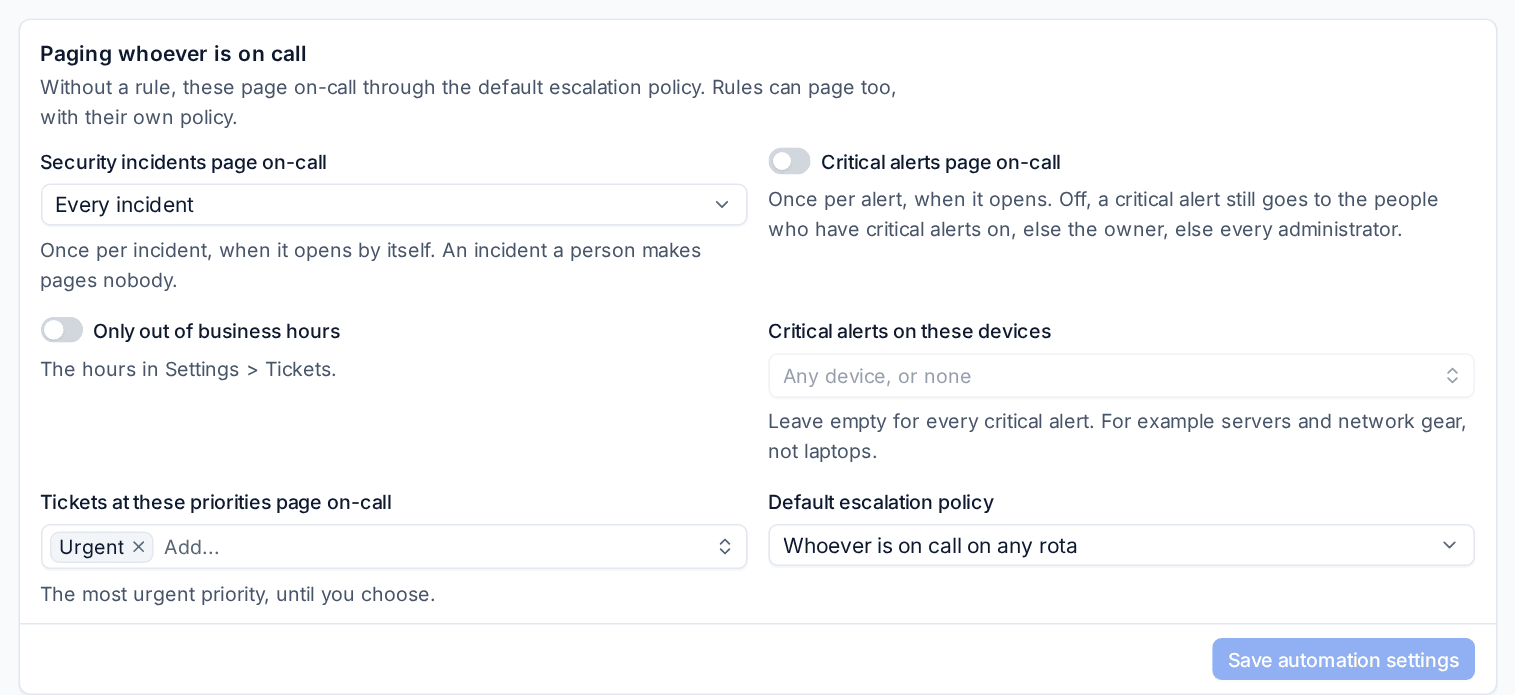
- Security incidents page on-call: an incident Tenvara opens by itself pages once (Every incident by default). An incident a person makes pages nobody: they are already looking at it. What joins an incident later does not page again.
- Critical alerts page on-call: off on a new install. Off, a critical alert that is not part of an incident still goes to the people who have critical alerts on, else the owner, else every administrator. It just does not wake anyone.
- Only out of business hours, Critical alerts on these devices, Tickets at these priorities page on-call and Default escalation policy work as before.
With no rota and no escalation policy, an incident goes to the customer's owner, else every administrator, with the line "Nobody is on call (there is no on-call rota or escalation policy), so this comes to you." See On-call.
Alert tickets get an owner
A ticket raised from an alert is assigned when it is made: to the person the alert rule names, else the customer's owner (when they work tickets), else the person chosen in Who alert tickets go to on Settings > Alert rules. Left at Nobody: the queue decides, the queue picks it up. See When an alert becomes a ticket.
Alerts nobody has picked up
Tenvara checks every few minutes for work that is sitting unowned, and sends each one through the chain once:
- a ticket raised from a critical alert that still has nobody assigned one working hour after it opened;
- an open alert nobody has touched (no acknowledgement, owner, snooze or note by a person) for 7 days, or 1 working day when it is critical. Information alerts are left alone.
People hear about these through the Alerts nobody has picked up notification. When more than five are due at once, they arrive as one summary instead ("Nobody is assigned to 12 alert tickets", "Nobody has picked up 30 alerts") with a link to the list.
SLA warnings on tickets nobody has
An SLA warning or breach told to "the assignee" on a ticket with no assignee goes, in order, to the queue's lead, the queue's people, the service desk leads you chose, then the routing chain's fallback (the customer's owner, then every administrator). The ticket's activity says who was told. See SLA policies and escalations.
When routing reaches nobody
Settings > System status has a Critical alert routing line. It shows Worth a look when:
- a role used for critical or security notifications is held by nobody active ("Critical alerts go to NOC security analyst: nobody holds it");
- paging is switched on but there is no on-call rota or escalation policy;
- a page would reach nobody, for example a rota with no active members.

Until it is put right, critical alerts still reach the customer's owner, else every administrator. To fix it:
- Give the role to someone in Settings > Users, or change who gets the event in Settings > Notifications, on the Defaults by role tab.
- Or set up a rota in Team > On-call and pick it as the Default escalation policy.
- Or switch off the paging you do not use on the General tab of Settings > Channels.
Tip: On a small team, giving the Critical alerts event to your technicians' role on the Defaults by role tab is usually enough. The chain then rarely needs its fallback.
Related
Was this page helpful?
Thanks for the feedback.