After an update: problems found and the email limit
How problems that already existed before an update or a rule change arrive as one digest per person, and how the per-minute notification limit keeps any burst to a few emails and a summary.
An update can teach Tenvara to see something it missed before: a check that now runs, a rule that is now sharper. The first time it looks, it can find dozens of problems that have been true for weeks, across many customers. The same happens when you switch on an alert type or a detection rule. Those are real, but they are not emergencies that started a minute ago, and nobody should get hundreds of emails about them.
Two things keep this calm: Found after update, which gathers old problems into one message per person, and a limit on how many notifications any one person gets a minute.
Found after update
After an update, or after an alert type or a detection rule is switched on or changed, Tenvara gathers what it finds for a while (60 minutes unless you change it). An alert raised in that time whose problem started before the change is marked Found after update.
Such an alert still opens, gets its ticket and shows in every list. What changes is who is told:
- no critical alert message and no page;
- no alert rule email;
- no SLA escalation of its ticket (a person escalating it by hand still tells whoever they choose);
- other messages about it, and findings reports sent in that time, are folded into the digest.
A problem that starts after the update is told at once, as always. A device that goes offline right after the update is not mistaken for an old problem.
The digest
When the time is up, each person gets one message, in the app and by email, for example "Found 54 existing problems across 18 customers: review", saying how many are critical. Its link opens exactly those alerts.
It goes to the people who have Problems found after an update switched on in Settings > Notifications (by default everyone whose role works alerts), else the administrators, and to anyone whose own messages it folded. See Notifications.
Finding them in the list
On Alerts:
- each one carries a Found after update badge;
- the Origin filter picks Found after update or Raised as usual, and the Origin column shows it;
- Views has a Found after update view.
Work them like any other alert. Most are worth a look, just not at three in the morning.
Changing how long it gathers
Open Settings > Monitoring, the Policies tab, and find Outages and alert storms under Alert noise.
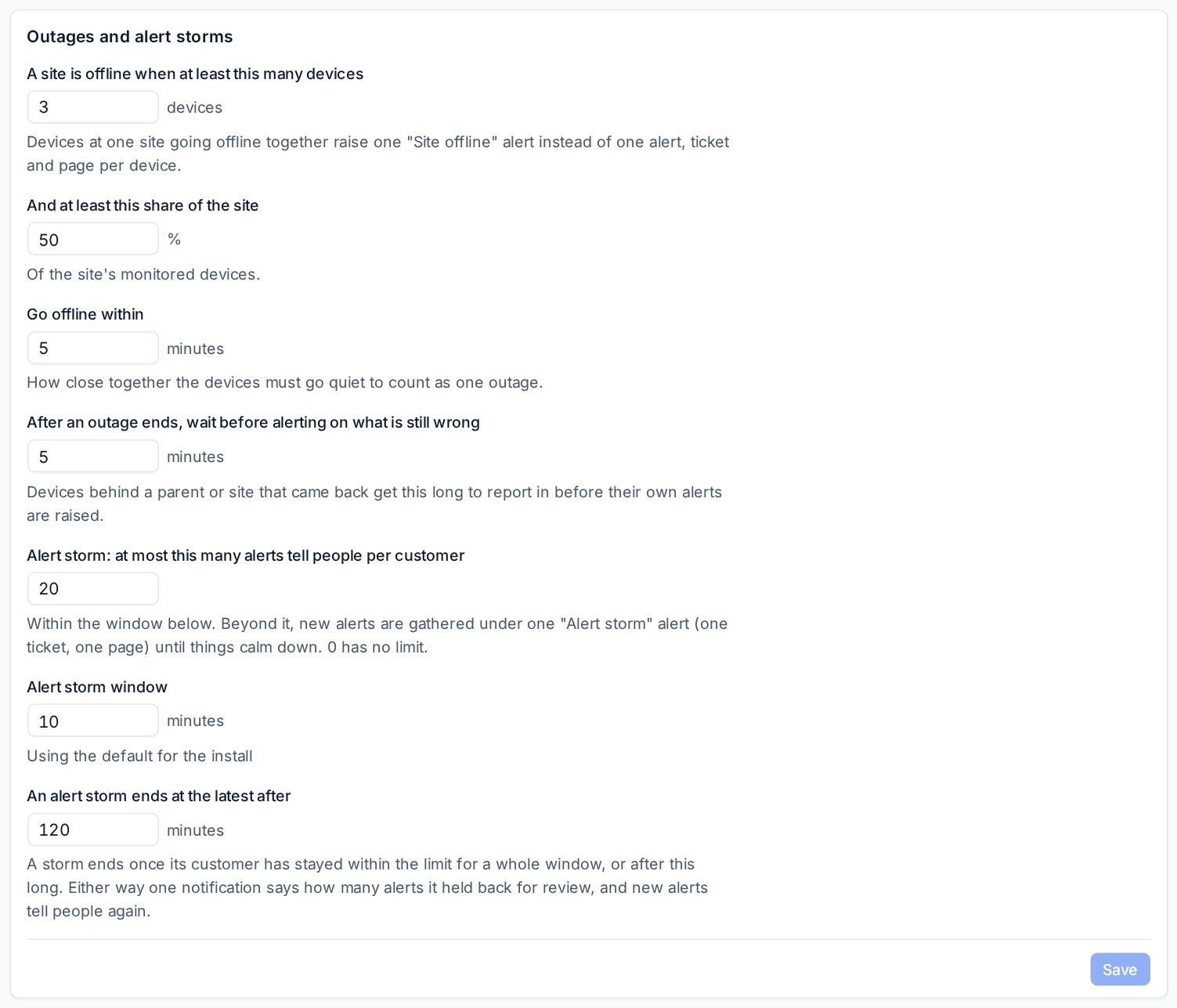
After an update or a rule change, gather what it finds for is 60 minutes. Set it to 0 to tell each one as usual.
Alerts found after an update never start or join an alert storm. See Alert storms and first-run findings.
At most 10 notifications a minute
However many alerts arrive at once, across however many customers, nobody gets more than 10 notifications a minute on any one channel, such as email, text, phone call, Teams or Slack.
- Within the limit, the first ten of a minute go at once, whatever they are. A new critical in a quiet minute is never delayed.
- Above it, the rest of that minute are held back. When the minute ends, each person gets one summary email, for example "390 more notifications held back, 97 critical: review", with the critical ones in their own section at the top and a Review them button. Held texts, calls and chat messages are listed in the email.
- The notification inbox is never limited: every notification is there.
- Posts to a shared channel (a rule's "also post to #alerts") are not counted.
The limit is At most this many notifications a minute to one person on the same card in Settings > Monitoring. It starts at 10; 0 has no limit.
A held copy still counts as reaching the person, so the routing chain never widens to more people because of the limit. See Who gets told: the routing chain.
Checking whether anything was held
Settings > System status has a Notifications a minute per person line. It reads "Nothing held back in the last day" with the limit, or Worth a look with how many were held, for how many people and when last. Settings > Channels shows a held message as Held back. See System status.
Tip: If the line shows held notifications on an ordinary day, look at what caused the burst before raising the limit. An alert rule that emails too widely, or a noisy source in the weekly noise review, is usually the real fix.
Both editions
Both work the same in the Company edition. The digest there names no customer count.
Related
Was this page helpful?
Thanks for the feedback.