Laptops that missed their window: catch-up updates
A laptop or desktop that was off for its whole maintenance window gets the missed updates at its next check-in, asking the signed-in person first, or in a daily catch-up window. How it works, putting it off, restarts and the missed-window flag.
Maintenance windows suit servers and desktops that stay on. Laptops are different: the default window is weeknights at 22:00, and a laptop that goes home in a bag every evening is never on for it. Without help, its updates would wait for ever. Catch up when next online fixes that: when a device was off for its whole window, the missed updates go to it at its next check-in, and the person using it is asked before anything installs.
Switching it on
Catch-up is part of the patch policy, so it can differ for a customer, a site, a device group or one device like any other patch setting.
- Go to Devices > Patches and choose the Policies tab.
- Open the policy, for example the Default policy, and find Catch up when next online.
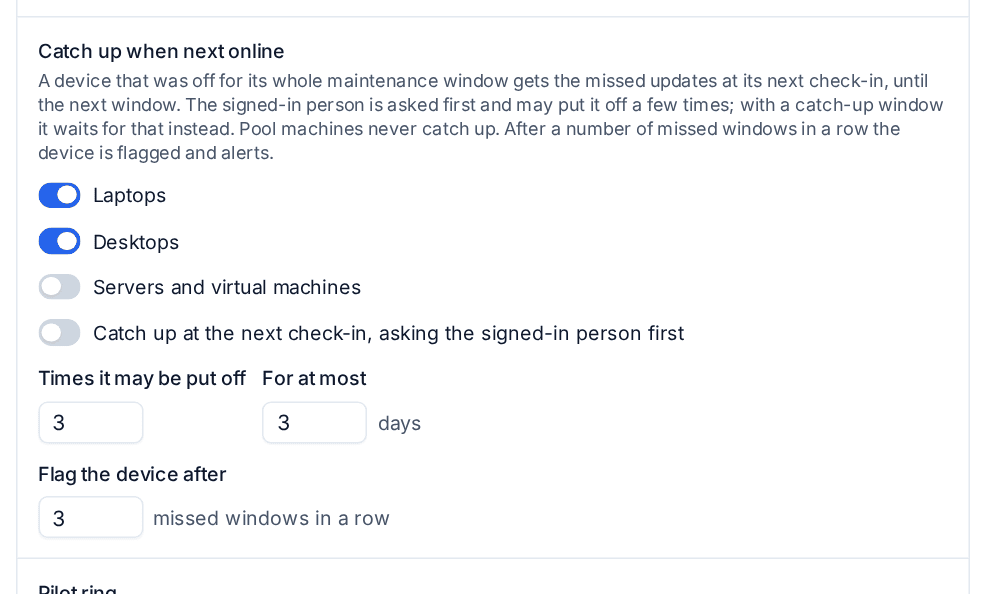
- Choose which devices catch up: Laptops and Desktops are on by default, Servers and virtual machines off.
- Choose how they catch up (below): at the next check-in, asking first, or in a daily catch-up window.
- Set Flag the device after a number of missed windows in a row (3 by default).
- Save the policy.
Pooled session hosts (shared remote desktop machines in a pool) keep their own window and never catch up, whatever the policy says. Network kit and phones never catch up either.
When a catch-up runs
A window counts as missed when the install or app update scheduled for it ran out without the device ever taking it, because the device was offline for the whole window. When that happens and the policy lets the device catch up:
- Operating system updates: the updates from the missed install that are still missing are queued again at once, so the device gets them at its next check-in.
- App updates: the catalogue apps still out of date are queued too. An app someone has open is skipped and left for the next catch-up or window: a catch-up never closes an app in the working day.
- Until the next window: a catch-up lasts until the device's next regular window, which then takes over.
Feature upgrades, Docker updates and the window's own restarts are not caught up: each can take the device away from its user for a long time, which is exactly what the window is there to avoid.
While a catch-up is waiting, the device's patch state reads Missed its maintenance window, catching up, in the device list and its Patches section. The job shows as Catching up, started by Catching up after a missed maintenance window.
Asking the person first
With Catch up at the next check-in, asking the signed-in person first, nothing installs without a word to whoever is using the computer. Before installing, the agent shows the update window from the tray, with Update now and Later.
- Update now installs straight away.
- Later, or no answer within 5 minutes, puts it off. The person may be in a meeting, so silence counts as later. Tenvara asks again 4 hours afterwards.
- Times it may be put off (3 by default) and For at most a number of days after the missed window (3 by default) set the limit. After that the window says the update is going ahead and installs at the end of its countdown.
- Nobody signed in: it installs at once, as there is nobody to ask.
If the agent has only just started when the catch-up arrives (after a restart, say) and someone is signed in, it waits up to 30 seconds for their tray to start so it can ask them; the job says Waiting for the signed-in user's tray before asking. If the tray does not start in time, it installs and the finished job says so: Nobody could be asked: the signed-in person's tray did not start within 30 s.
A catch-up window instead
Some customers would rather updates went in at lunchtime than ask anyone. Turn on Catch up in a daily catch-up window, without asking and set Catch-up window starts and Lasting (60 minutes by default). Missed work then waits for the next catch-up window and installs without a question.
Put off by the person
A catch-up the person put off is neither a success nor a failure, and Tenvara says exactly that:
- The job reads Put off by the person, with a line such as Put off 1 of 3 times, offered again at 15:20 and a link to the next attempt.
- Each update in it reads Put off by the person, or Put off: nobody answered the question in time.
- The updates stay missing and nothing else changes: a put-off job does not count as an install or a failure in the overview, compliance or reports.
- The device's history and its Work sent to the device list show the same badge.
When the person accepts the next one, or it can no longer be put off, that job reports what really happened, like any install.
Restarts during the day
A catch-up never restarts a laptop under someone mid-sentence. Where the policy's restart setting would restart by itself (Only if required, inside the window or Restart when required), a catch-up asks instead, with the policy's deadline, and the person can snooze it until then. Never stays never. See Patching.
Missed windows in a row
A device that misses window after window is worth a look: it may be in a drawer, or off every night for a reason. After the number of missed windows set in Flag the device after:
- its patch state shows Behind, Missed 3 maintenance windows in a row;
- one alert is raised for the device.
Both clear by themselves as soon as the device takes a scheduled or catch-up job again, whether it worked or not.
Related
Was this page helpful?
Thanks for the feedback.