When an alert becomes a ticket
Why an alert's ticket follows after a short wait, how detections and vulnerabilities make tickets, which alerts always make one at once, and how to change it per customer.
A ticket is work for a person. Many alerts clear on their own within minutes (a blip, a restart, a short outage), and a ticket for each of those buries the ones that matter. So an alert rule that opens tickets now waits a little first, a security detection makes a ticket only when it is an incident, and vulnerability alerts share one ticket a week.
Which alerts make tickets at all is still decided by your alert rules. This guide is about when and how. For the rules themselves, see Alerts into tickets and notifications.
Note: Alert tickets need the service desk module, which every install starts with.
The settings
Open Settings > Alert rules. Below the rules and the recent alerts is the Alerts to tickets card.
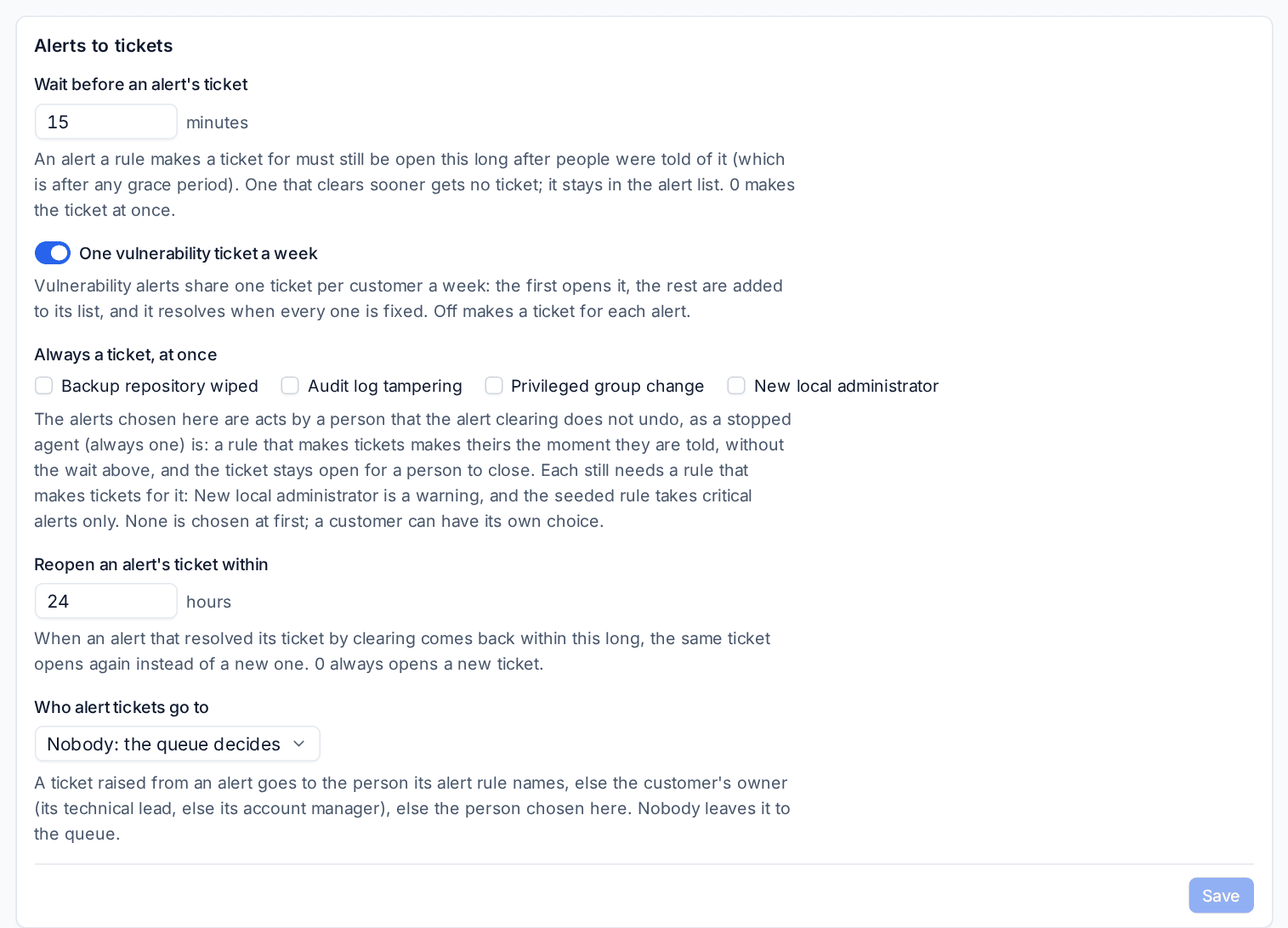
| Setting | What it does | Starts at |
|---|---|---|
| Wait before an alert's ticket | A ticket follows only if the alert is still open this long after people were told of it | 15 minutes |
| One vulnerability ticket a week | Vulnerability alerts share one ticket per customer per week | On |
| Always a ticket, at once | The alert types chosen here skip the wait, and their ticket stays open for a person to close | None chosen |
| Reopen an alert's ticket within | An alert that comes back this soon reopens its earlier ticket | 24 hours |
| Who alert tickets go to | Who an alert ticket goes to when the rule names nobody and the customer has no owner | Nobody: the queue decides |
Every one but Who alert tickets go to can be different for one customer, on that customer's Settings tab. See The settings catalogue and overrides.
The wait before a ticket
The wait starts when people were told of the alert, which is after any grace period the alert type has. When the time is up:
- the alert is still open: the ticket is made, as the rule says;
- the alert has cleared: no ticket. The alert stays in the alert list, and its timeline says "No ticket: it cleared before its settle time was up."
An alert that has already been open longer than the wait when a rule first matches it (it rose to critical an hour in) gets its ticket at once. Acknowledging or snoozing an alert during the wait does not stop its ticket.
Set Wait before an alert's ticket to 0 to make tickets the moment an alert is told, as before.
Tip: The wait affects tickets only. People who should hear about the alert are told at once, and paging is unchanged.
Security detections: only incidents
A detection's alert makes a ticket only when the detection is part of an incident, meaning a person needs to decide something. A critical or High detection is an incident on its own; lower ones only when they combine. One incident is one ticket, and the detections that join it are added to that ticket.
A detection that is not an incident says "No ticket: this detection is not an incident. It gets one if it becomes part of one." While a detection's alert is waiting, its page says "No ticket yet: one follows if this alert is still open at" a given time. See Incidents and response.
One vulnerability ticket a week
Vulnerability alerts (priority, high, overdue and waiting) for one customer share a ticket:
- the first opens "Vulnerabilities to fix this week" with its list;
- the rest are added as notes ("Added to this week's list: ...") and the subject counts what is still open, unless a person has rewritten it;
- the ticket takes the soonest fix deadline of its alerts, and resolves when every alert on it has cleared;
- the week runs 7 days from when the ticket opened; an alert after that opens next week's.
Switch off One vulnerability ticket a week to make a ticket for each alert again. With an external PSA connected, the week's ticket there takes the notes.
Always a ticket, at once
Some alerts are about something a person did, and the alert clearing does not undo it. When someone stops the Tenvara agent, the agent coming back ten minutes later does not mean nobody needs to look.
- Agent stopped, removed or tampered with always works this way, whatever you choose.
- Under Always a ticket, at once you can add Backup repository wiped, Audit log tampering, Privileged group change and New local administrator.
For these, a rule that makes tickets makes theirs the moment people are told, without the wait. The ticket says who did what and when, and "This ticket stays open for a person to close: the alert clearing does not undo what happened." When the alert clears, the ticket gets a note and stays open.
Note: The setting does not make a ticket by itself: a rule must still match the alert. New local administrator is a warning, and the rule a new install starts with, Critical alerts become tickets, takes critical alerts only. Add a rule for it if you want its tickets.
Who the ticket goes to
An alert ticket is assigned when it is made: to the person the rule names, else the customer's owner (its technical lead, else its account manager, when they work tickets), else the person in Who alert tickets go to. If it is still unassigned an hour into business hours and the alert was critical, the routing chain tells someone. See Who gets told: the routing chain.
Each alert says what happened
Every alert's timeline says which of these applied: the ticket made after the wait, no ticket because it cleared first, no ticket because the detection is not an incident, or added to this week's vulnerability ticket. Settings > Alert rules also shows, under Recent alerts, which rule would take each recent alert.
Alerts found right after an update still get their tickets, but nobody is told about them one by one and their tickets do not escalate. See After an update: problems found and the email limit.
Was this page helpful?
Thanks for the feedback.